
Kia Picanto: Power windows : (if equipped) / Remote window closing/opening system
|
Figure 1. Remote key 
|
Figure 2. Smart Key 
|
-
Door lock button:
 Used to lock the doors and, when held as described below, raise the
compatible windows.
-
Door unlock button:
 Used to unlock the doors and, when held as described below, lower the
compatible windows.
The remote window function allows you to operate compatible windows on your Kia Picanto even with the engine switched off. Window movement depends on keeping the relevant key button pressed.
-
To close the windows, press and hold the door lock button (1) for more than three seconds. The doors lock first, after which the windows rise for as long as you continue holding the button.
Release the door lock button (1) to stop the windows at their current position.
-
To open the windows, press and hold the door unlock button (2) for more than three seconds. The doors unlock first, after which the windows lower while the button remains pressed.
Release the door unlock button (2) when you want the window movement to stop.
Enable or disable this function through Setup > Vehicle > Door > Remote Window Control. The selected setting determines whether remote opening and closing are available.
Remote control operates only the windows equipped with automatic up/down operation and the associated safety function. Windows without this equipment do not respond to the remote window command.
CAUTION
-
Moving away from the vehicle during remote window operation may cause the windows to stop unexpectedly. Remain close to the vehicle and watch the windows throughout their movement.
-
An obstruction or resistance affecting one window may cause that window to stop.
The other windows may continue moving, so their positions can differ after the same remote command.
Check each window individually to confirm that all are fully closed before leaving the vehicle.
-
Use remote window opening with care: the command also unlocks the doors. Check the vehicle’s locking status after using this function.
NOTE
The remote window function applies only to windows fitted with the automatic power window system. Its availability therefore depends on the equipment installed in your Kia Picanto.
TIP
Software updates may change the infotainment menus or their appearance. For current operating guidance, consult the manual available through the infotainment system and the accompanying quick reference guide.
 Window opening and closing. Power window lock button : (if equipped)
Window opening and closing
The driver’s door contains the master power window controls for your Kia Picanto, together with the power window lock
switch...
 Manual windows
Turn the window regulator handle clockwise or anticlockwise to raise or lower the glass...
Other information:
Kia Picanto 2024-2026 Owner's Manual: Shopping bag holder. Clothes hanger
Shopping bag holder CAUTION Do not hang a bag weighing more than 3 kg (7 lbs.) from the holder. Exceeding this limit may damage the shopping bag holder. Do not suspend fragile items from the holder when driving on rough roads...
Ford Explorer 2020-2026 Service Manual: Description and Operation - Low One-Way Clutch Assembly
One-Way Clutch (OWC) Exploded View Item Description 1 Front support assembly 2 One-Way Clutch (OWC) 3 Sun gear No. 1 4 Sun gear No. 2 One-Way Clutch (OWC) Mechanical Operation The One-Way Clutch (OWC) is a brake clutch that holds the sun gears No...
Categories
- Manuals Home
- 6th Generation Explorer Owners Manual
- 6th Generation Explorer Service Manual
- Removal and Installation - All-Wheel Drive (AWD) Module
- Engine
- Fuel Filler Funnel Location & Running Out of Fuel
- New on site
- Most important about car
Windshield Wipers
 Push the lever up or down to operate
the windshield wipers.
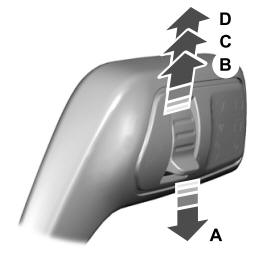
A - Single wipe.
