
Ford Explorer: Climate Control System - General Information / Removal and Installation - Driver Side Register
Ford Explorer 2020-2026 Service Manual / Electrical / Climate Control System / Climate Control System - General Information / Removal and Installation - Driver Side Register
Special Tool(s) / General Equipment
| Interior Trim Remover |
Removal
NOTE: Removal steps in this procedure may contain installation details.
-
Release the clips and remove the trim panel.
.jpg) |
-
Remove the bolts, release the clips and remove the display.
-
Disconnect the electrical connector.
Torque: 19 lb.in (2.1 Nm)
-
Disconnect the electrical connector.
.jpg) |
-
Release the clips and remove the center register trim panel.
.jpg) |
-
Remove the bolt, release the clips and remove the IPC bezel and upper steering column trim panel.
Use the General Equipment: Interior Trim Remover
.jpg) |
-
Release the tabs and remove the driver side register.
.jpg) |
Installation
-
To install, reverse the removal procedure.
 Removal and Installation - Driver Side Footwell Air Discharge Temperature Sensor
Removal
Remove the driver side knee airbag.
Refer to: Driver Knee Airbag (501-20B Supplemental Restraint System, Removal and Installation).
Disconnect the electrical connecto..
 Removal and Installation - Driver Side Register Air Discharge Temperature Sensor
Removal
Remove the IPC.
Refer to: Instrument Panel Cluster (IPC) (413-01 Instrumentation, Message Center and Warning Chimes, Removal and Installation)...
Other information:
Ford Explorer 2020-2026 Service Manual: Description and Operation - Wireless Accessory Charging Module (WACM) - Overview
The WACM is a 5 watt wireless power transmitter designed to energize a secondary coil found in a secondary device such as a smartphone or in an added accessory such as a wireless charging phone sleeve. The WACM supports wireless charging of the Wireless Power Consortium’s (WPC) Qi (pronounced chee)...
Ford Explorer 2020-2026 Service Manual: General Procedures - Bearing Inspection
I..
Categories
- Manuals Home
- 6th Generation Explorer Owners Manual
- 6th Generation Explorer Service Manual
- Interior Trim and Ornamentation
- General Procedures - Transmission Fluid Drain and Refill
- Removal and Installation - Front Halfshaft Speed Sensor
- New on site
- Most important about car
Locking and Unlocking
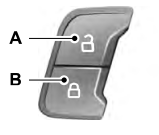
You can use the power door lock control or the remote control to lock and unlock your vehicle.
Power Door Locks
The power door lock control is on the driver and front passenger door panels.

Copyright © 2026 www.foexplorer.com