
Ford Explorer: Accessory Charging / Description and Operation - Wireless Accessory Charging Module (WACM) - Overview
The WACM is a 5 watt wireless power transmitter designed to energize a secondary coil found in a secondary device such as a smartphone or in an added accessory such as a wireless charging phone sleeve. The WACM supports wireless charging of the Wireless Power Consortium’s (WPC) Qi (pronounced chee).
The WACM node is powered at all times from a fused battery and performs network management on HS-CAN3. Wireless charging status is provided as a CAN signal on the HS-CAN3.
The BCM provides a protected switch to battery input to the WACM when an interior passive key search is in progress to disable the wireless charging feature. This prevents possible interference with the passive key when placed in close proximity to the WACM during a charge session of a secondary device. A redundant CAN signal is also sent by the BCM in addition to the protected switch to battery input.

 Description and Operation - Wireless Accessory Charging Module (WACM) - System Operation and Component Description
System Operation
System Diagram
Item
Description
1
APIM
2
BCM
3
ACM
4
WACM
5
GWM
Network Message Chart
..
Other information:
Ford Explorer 2020-2026 Service Manual: Diagnosis and Testing - High Voltage Battery, Mounting and Cables
Diagnostic Trouble Code (DTC) Chart Diagnostics in this manual assume a certain skill level and knowledge of Ford-specific diagnostic practices. REFER to: Diagnostic Methods (100-00 General Information, Description and Operation). WARNING: To prevent the risk of high-voltage shock, always follow precisely all warnings and service instructions, including instructions to depower the..
Ford Explorer 2020-2026 Service Manual: Description and Operation - Second Row Seats - Overview
Overview Heated Seats If equipped with the heated seat system, the rear seat cushion and backrest can be heated at one of two levels on demand. The components of the rear heated seat system include: Seat cushion heater mat (LH/ RH) Seat backrest heater mat (LH/ RH) Heated seat module (attached to the underside of the RH second row seat cushion frame) Heated seat switches (..
Categories
- Manuals Home
- 6th Generation Explorer Owners Manual
- 6th Generation Explorer Service Manual
- Driveline
- Description and Operation - Jacking and Lifting - Overview
- Automatic Transmission - 10-Speed Automatic Transmission – 10R60
- New on site
- Most important about car
Gauges
4 Inch Display
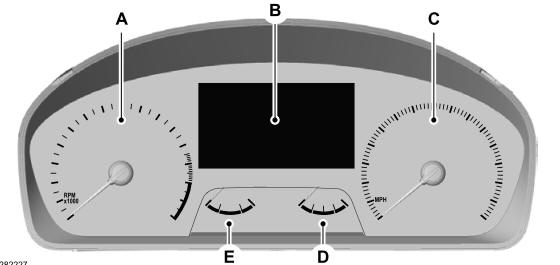
A - Tachometer.
B - Information display.
C - Speedometer.
D - Fuel gauge.
E - Engine coolant temperature gauge.
