Ford Explorer: Instrument Cluster / Gauges
4 Inch Display
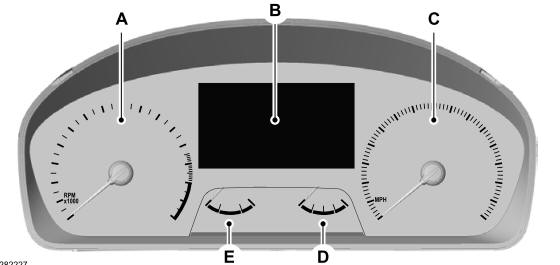
A - Tachometer.
B - Information display.
C - Speedometer.
D - Fuel gauge.
E - Engine coolant temperature gauge.
Information Display
Information that appears depends on your vehicle settings. See General Information.
6 Inch Display
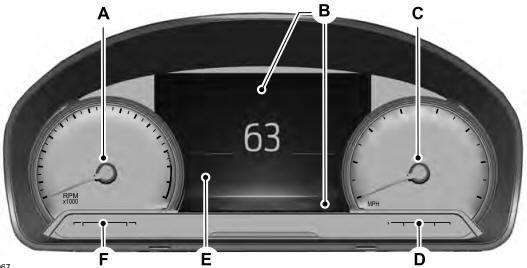
A - Tachometer.
B - Information bar.
C - Speedometer.
D - Fuel gauge.
E - Information display.
F - Engine coolant temperature gauge.
Information Bar
Displays information related to the navigation, outside air temperature, odometer and distance to empty.
Distance to Empty - Indicates the approximate distance your vehicle can travel on the fuel remaining in the tank. Changes in driving pattern can cause the value to not only decrease but also increase or stay constant for periods of time.
Information Display
Information that appears depends on your vehicle settings. See General Information.
12 Inch Display
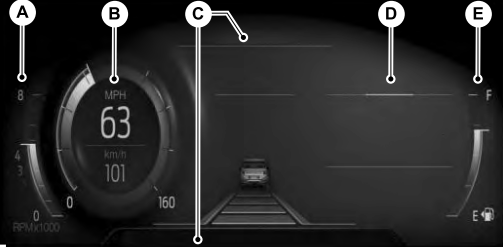
A - Tachometer.
B - Speedometer.
C - Information bar.
D - Information display.
E - Fuel gauge.
Information Bar
Displays information related to the current audio source, navigation, outside air temperature and distance to empty.
Distance to Empty - Indicates the approximate distance your vehicle can travel on the fuel remaining in the tank. Changes in driving pattern can cause the value to not only decrease but also increase or stay constant for periods of time.
Information Display
Information that appears depends on current gauge view and on-demand settings. See General Information.
Engine Coolant Temperature Gauge
Indicates engine coolant temperature. At normal operating temperature, the level indicator will be in the normal range. If the engine coolant temperature exceeds the normal range, stop your vehicle as soon as safely possible, switch off the engine and let the engine cool.
WARNING: Do not remove the coolant reservoir cap when the engine is on or the cooling system is hot. Wait 10 minutes for the cooling system to cool down. Cover the coolant reservoir cap with a thick cloth to prevent the possibility of scalding and slowly remove the cap. Failure to follow this instruction could result in personal injury.
Fuel Gauge
The fuel gauge indicates about how much fuel is in the fuel tank.
The arrow adjacent to the fuel pump symbol indicates on which side of your vehicle the fuel filler door is located.
Note: The fuel gauge may vary slightly when your vehicle is moving or on a slope.
Low Fuel Reminder
A low fuel level reminder displays and sounds when the distance to empty reaches 75 mi (120 km) to empty for MyKey, and at 50 mi (80 km), 25 mi (40 km), 10 mi (20 km) and 0 mi (0 km) for all vehicle keys.
Note: The low fuel reminder can appear at different fuel gauge positions depending on fuel economy conditions. This variation is normal.

 Warning Lamps and Indicators
The following warning lamps and indicators alert you to a vehicle condition that
may become serious. Some lamps illuminate when you start your vehicle to make sure
they work...
Other information:
Ford Explorer 2020-2026 Service Manual: Removal and Installation - Roof Moulding
Removal NOTE: Removal steps in this procedure may contain installation details. NOTE: LH side shown, RH side similar. Lower the headliner. Refer to: Headliner - Lowering (501-05 Interior Trim and Ornamentation, Removal and Installation)...
Ford Explorer 2020-2026 Service Manual: Removal and Installation - Rear Quarter Panel Moulding
Special Tool(s) / General Equipment Interior Trim Remover Removal NOTE: Removal steps in this procedure may contain installation details. NOTE: LH side shown, RH side similar. Remove the pushpins. Remove the retainer clips and moulding...
Categories
- Manuals Home
- 6th Generation Explorer Owners Manual
- 6th Generation Explorer Service Manual
- Automatic Transmission
- Removal and Installation - Front Halfshaft Speed Sensor
- Fuel Filler Funnel Location & Running Out of Fuel
- New on site
- Most important about car
Intelligent Access Key
Note: You may not be able to shift out of park (P) unless the intelligent access key is inside your vehicle.