
Ford Explorer: Lane Keeping System / Description and Operation - Lane Keeping System - Component Location
Ford Explorer 2020-2026 Service Manual / Electrical / Electronic Feature Group / Lane Keeping System / Description and Operation - Lane Keeping System - Component Location
Component Location - Lane Keeping System
.jpg)
| Item | Description |
|---|---|
| 1 | IPMA. |
| 2 | Lane keeping system (LKS) switch (integral to the LH steering column multifunction switch). |
| 3 | Lane centering switch (integral to the steering wheel). |

 Description and Operation - Lane Keeping System - Overview
Overview
The
Lane Keeping System (LKS) has 2 functions, lane keeping aid and lane
keeping alert. The Lane Keeping System (LKS) utilizes the camera located
in the IPMA to detect
and track the road..
Other information:
Ford Explorer 2020-2026 Owners Manual: Hazard Flashers
Note: The hazard flashers operate when the ignition is in any position, or if the key is not in the ignition. If used when the vehicle is not running, the battery loses charge. As a result, there may be insufficient power to restart your vehicle...
Ford Explorer 2020-2026 Service Manual: Removal and Installation - Exterior Front Door Handle Reinforcement
Removal NOTE: LH (left-hand) side shown, RH (right-hand) side similar. Remove the front door latch. Refer to: Front Door Latch (501-14 Handles, Locks, Latches and Entry Systems, Removal and Installation). NOTE: This step is only necessary when installing a new component...
Categories
- Manuals Home
- 6th Generation Explorer Owners Manual
- 6th Generation Explorer Service Manual
- Removal and Installation - Front Halfshaft Speed Sensor
- Traction Control
- General Service Information
- New on site
- Most important about car
Locking and Unlocking
You can use the power door lock control or the remote control to lock and unlock your vehicle.
Power Door Locks
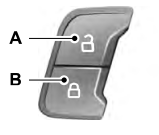
The power door lock control is on the driver and front passenger door panels.

Copyright © 2026 www.foexplorer.com