
Ford Explorer: Intake Air Distribution and Filtering - 2.3L EcoBoost (201kW/273PS) / Removal and Installation - Charge Air Cooler (CAC)
Ford Explorer 2020-2026 Service Manual / Powertrain / Engine / Intake Air Distribution and Filtering - 2.3L EcoBoost (201kW/273PS) / Removal and Installation - Charge Air Cooler (CAC)
Removal
NOTICE: The turbocharger compressor vanes can be damaged by even the smallest particles. When removing any turbocharger or engine air intake system component, ensure that no debris enters the system. Failure to do so may result in damage to the turbocharger.
NOTE: Removal steps in this procedure may contain installation details.
-
Remove the front undershield.
Refer to: Engine Front Undershield (501-02 Front End Body Panels, Removal and Installation).
Refer to: Engine Rear Undershield (501-02 Front End Body Panels, Removal and Installation).
-
Remove the Radiator Grille Opening Panel.
Refer to: Radiator Grille Opening Panel (501-02 Front End Body Panels, Removal and Installation).
-
Remove the air cleaner.
Refer to: Air Cleaner (303-12B Intake Air Distribution and Filtering - 3.0L EcoBoost, Removal and Installation).
-
Loosen the clamp, disconnect the CAC intake hose.
Torque: 42 lb.in (4.8 Nm)
.jpg) |
-
-
Disconnect the manifold pressure sensor connector.
-
Loosen the clamp and disconnect the CAC outlet hose
Torque: 42 lb.in (4.8 Nm)
-
Disconnect the manifold pressure sensor connector.
.jpg) |
-
-
Disconnect the quick release coupling.
Refer to: Quick Release Coupling (310-00B Fuel System - General Information - 3.0L EcoBoost, General Procedures).
-
Remove the bolt.
Torque: 71 lb.in (8 Nm)
-
Disconnect the quick release coupling.
.jpg) |
-
-
Dislodge the retainer.
-
Rotate the CAC forward off the lower mounting positions.
-
Dislodge the retainer.
.jpg) |
Installation
-
Inspect the turbocharger or engine air intake system components and clean, if necessary.
-
To install, reverse the removal procedure.
 Removal and Installation - Air Cleaner Outlet Pipe
Special Tool(s) /
General Equipment
Side Cutter Pliers
Hose Clamp Remover/Installer
Removal
NOTICE:
The turbocharger compressor vanes can be damaged by even the
smallest particl..
 Removal and Installation - Charge Air Cooler (CAC) Intake Pipe
Removal
NOTICE:
The turbocharger compressor vanes can be damaged by even the
smallest particles. When removing any turbocharger or engine air intake
system component, ensure that no debris enter..
Other information:
Ford Explorer 2020-2026 Service Manual: Removal and Installation - Air Conditioning (A/C) Compressor Belt
Special Tool(s) / General Equipment 303-1252Stretchy Belt Remover/ Installer ToolTKIT-2006UF-FLMTKIT-2006UF-ROW Removal NOTICE: Under no circumstances should the accessory drive belt, tensioner or pulleys be lubricated as potential damage to the belt material and tensioner damping mechanism will occur...
Ford Explorer 2020-2026 Service Manual: Removal and Installation - Coolant Pump
Special Tool(s) / General Equipment Hose Clamp Remover/Installer Removal NOTE: Removal steps in this procedure may contain installation details. Drain the cooling system. Refer to: Engine Cooling System Draining, Vacuum Filling and Bleeding (303-03A Engine Cooling - 2...
Categories
- Manuals Home
- 6th Generation Explorer Owners Manual
- 6th Generation Explorer Service Manual
- Electric Parking Brake
- Description and Operation - Identification Codes
- Body and Paint
- New on site
- Most important about car
Locking and Unlocking
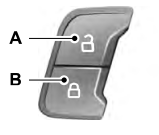
You can use the power door lock control or the remote control to lock and unlock your vehicle.
Power Door Locks
The power door lock control is on the driver and front passenger door panels.

Copyright © 2026 www.foexplorer.com