Kia Picanto: Driver assistance guide / Rear View Monitor (RVM): (if equipped)
Rear View Monitor shows the area behind the Kia Picanto to assist with parking and manoeuvring.
NOTE
If a display audio system or an additional infotainment system that is a Kia Genuine Part is installed, Rear View Monitor may operate differently from the description in this owner’s manual. For setup and operating instructions, refer to the web manual for that system.
Detecting sensor
|
Figure 1. Rear view camera 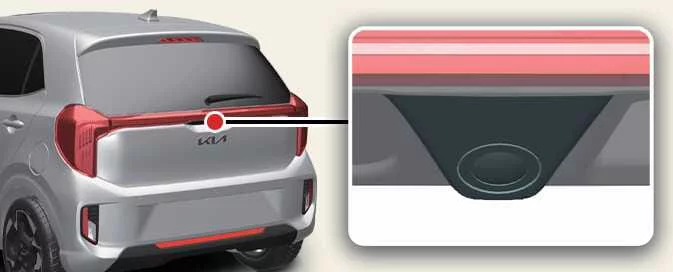
|
The illustration above shows the location of the rear view camera.
Rear View Monitor settings
Warning Methods
 |
A: Driver Assistance
|
With the Kia Picanto switched on, open Setup > Vehicle > Driver Assistance > Warning Methods in the infotainment system to adjust the available setting:
-
Parking Safety Priority: Lowers the volume of other audio while Rear View Monitor is active.
TIP
-
A change to Warning Methods may affect multiple driver assistance functions. Review the settings for each function and adjust them as needed.
-
After the vehicle is restarted, Warning Methods retains the last selected setting.
-
This menu may not be available, depending on the vehicle’s specification.
Camera Settings
|
A: Camera Settings
|
With the vehicle switched on, select the setup icon ( ) on the screen, or open Setup >
Vehicle > Driver Assistance > Parking Safety > Camera Settings in the infotainment system to adjust Rear
View Monitor.
) on the screen, or open Setup >
Vehicle > Driver Assistance > Parking Safety > Camera Settings in the infotainment system to adjust Rear
View Monitor.
Extended Rear View Monitor
When Extended Rear View Monitor is selected, the rear camera view remains on the display after shifting from R (Reverse) to N (Neutral) or D (Drive).
Rear View Parking Guidance
When Rear View Parking Guidance is selected under display information, the parking guidance lines appear on the rear monitor.
Display settings
Use Display settings to adjust the camera image brightness for day or night and its contrast.
NOTE
Depending on the vehicle specification, Camera Settings may not be available.
NOTE
-
With the vehicle unladen, the horizontal rear view parking guide lines indicate distances of approximately 0.5 m (20 in.), 1 m (40 in.) and 2.3 m (91 in.) behind the vehicle.
-
With the vehicle unladen, the horizontal rear top view guide lines indicate the tailgate opening distance and a distance of approximately 1.5 m (60 in.) from the vehicle.
Rear View Monitor operation
Rear view
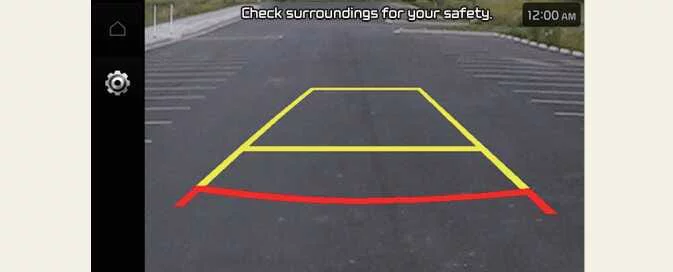 |
Operating conditions
The Rear View display turns on when:
-
You shift into R (Reverse).
Off conditions
While parking, the Rear View display turns off when:
-
You shift into P (Park).
NOTE
The Rear View display remains on while the Kia Picanto is in R (Reverse).
Extended Rear View Monitor
Extended Rear View Monitor keeps the rear camera image on the display when you shift from R (Reverse) to N (Neutral) or D (Drive), helping you continue to see the area behind the Kia Picanto while parking.
Operating conditions
The rear view remains displayed when both of the following conditions are met:
-
You shift from R (Reverse) to N (Neutral) or D (Drive).
-
Your vehicle speed is below approximately 10 km/h (6 mph).
Off conditions
Extended Rear View Monitor switches off when either of the following occurs:
-
You shift into P (Park).
-
Your vehicle speed exceeds 10 km/h (6 mph).
Rear View Monitor malfunction and limitations
Rear View Monitor malfunction
If Rear View Monitor is not working correctly, the screen image may appear green, blue or black.
If the display flickers, the camera image is missing or the image otherwise appears abnormal, have the system checked by an authorised Kia dealer or service partner.
Limitations of Rear View Monitor
After the Kia Picanto has been stationary for a long time in winter, or has been parked in an indoor car park, exhaust fumes may temporarily obscure the camera image.
-
The camera display may look unusual in the following situation:
-
The tailgate is open.
-
WARNING
-
The wide rear view camera does not show the entire area behind the Kia Picanto. Before parking or reversing, check behind the vehicle directly using the interior and exterior rear-view mirrors as well as the camera display.
-
Objects may appear closer or farther away on the screen than they actually are because the camera image is calibrated. If cargo tilts the vehicle, the rear parking guide lines may not show the correct position. Check the surroundings directly before manoeuvring.
-
Keep the rear view camera lens clean. Dirt or other material on the lens can reduce image quality and interfere with Rear View Monitor. Do not clean the lens with chemical solvents, strong alkaline detergents or volatile organic solvents such as petrol or acetone, as these may damage it.
-
Driving with the tailgate open is not normal operation. If you must drive in this condition, remain alert and drive safely.
 Cruise Control (CC): (if equipped). Cruise Control operation
Cruise indicator
..
 Rear Cross-Traffic Collision-Avoidance Assist (RCCA): (if equipped)
When the Kia Picanto is reversing, Rear Cross-Traffic Collision-Avoidance Assist monitors for vehicles approaching
from the left or right behind the vehicle...
Other information:
Kia Picanto 2024-2026 Owner's Manual: AUTO HOLD : (if equipped)
Auto Hold keeps your Kia Picanto stationary after you bring it to a complete stop using the brake pedal. Once the function has engaged, it maintains the stop even when you take your foot off the pedal, so you do not need to keep pressing it while the vehicle remains held...
Ford Explorer 2020-2026 Service Manual: Removal and Installation - Charge Air Cooler (CAC) Intake Pipe
Removal NOTICE: The turbocharger compressor vanes can be damaged by even the smallest particles. When removing any turbocharger or engine air intake system component, ensure that no debris enters the system. Failure to do so may result in damage to the turbocharger...
Categories
- Manuals Home
- 6th Generation Explorer Owners Manual
- 6th Generation Explorer Service Manual
- Traction Control
- Auxiliary Power Points
- Body and Paint
- New on site
- Most important about car
Locking and Unlocking
You can use the power door lock control or the remote control to lock and unlock your vehicle.
Power Door Locks
The power door lock control is on the driver and front passenger door panels.