
Kia Picanto: Driver assistance guide / Cruise Control (CC): (if equipped). Cruise Control operation

|
|
Cruise Control lets the Kia Picanto maintain a selected speed above 30 km/h (20 mph) without requiring you to keep your foot on the accelerator pedal.
Cruise Control operation
Setting speed
 |
-
Accelerate to the speed you want to maintain. The selected speed must be above 30 km/h (20 mph).
-
At the desired speed, press the Driving Assist button. The set speed and Cruise indicator (
 ) appear on the
instrument cluster.
) appear on the
instrument cluster. -
Take your foot off the accelerator pedal.
The Kia Picanto will maintain the set speed without accelerator input.
NOTE
-
The vehicle may lose speed slightly on an uphill slope or gain speed slightly on a downhill slope.
-
The Driving Assist button symbol may differ depending on the vehicle’s equipment.
Increasing set speed
|
-
Move the (+) switch up and release it immediately to increase the set speed by 1 km/h. When the cluster displays speed in mph, the speed increases in increments of 5 mph.
-
To raise the set speed more quickly, move and hold the (+) switch. The set speed increases in increments of 10 km/h.
The maximum set speed is 180 km/h (110 mph). Depending on vehicle specifications and environmental conditions, the Kia Picanto may not be able to reach the selected speed.
Decreasing set speed
|
-
Move the (−) switch down and release it immediately to reduce the set speed by 1 km/h. To lower the speed more quickly, move and hold the (−) switch; the set speed decreases in increments of 10 km/h, or 5 mph when the cluster displays speed in mph.
-
The lowest speed that can be set is 30 km/h (20 mph).
Accelerating temporarily
To increase speed temporarily while Cruise Control is active, press the accelerator pedal.
Release the accelerator to return to the previously selected set speed.
If you move the (+) or (−) switch while travelling at the higher speed, Cruise Control sets the current speed as the new target.
Temporarily pausing Cruise Control
|
Cruise Control pauses in any of the following situations:
-
You press the brake pedal.
-
You press the pause switch (
). -
You shift the transmission to N (Neutral).
-
The vehicle’s speed falls below or rises above the set speed.
-
ESC (Electronic Stability Control) operates.
The set speed is cleared from the display, while the Cruise indicator ( ) stays
illuminated.
) stays
illuminated.
NOTE
If Cruise Control pauses for a reason not listed above, Kia recommends having the system checked by an authorised Kia dealer or service partner.
Resuming Cruise Control
|
To resume Cruise Control, use the (+), (−) or resume () switch.
Moving the (+) switch up or the (−) switch down sets the target speed to the current speed shown on the instrument cluster.
Pressing the resume switch () restores the previously selected speed.
The vehicle must be travelling above 30 km/h (20 mph) for Cruise Control to resume.
WARNING
Check the traffic and road conditions before pressing the resume switch ( ). The vehicle’s speed may increase or
decrease sharply when you press the switch (
). The vehicle’s speed may increase or
decrease sharply when you press the switch ( ).
).
Turning off Cruise Control
|
Press the Driving Assist button to switch off Cruise Control. The Cruise indicator () will go out.
When you are not using Cruise Control, switch it off to prevent setting a speed unintentionally.
NOTE
If the Kia Picanto is equipped with Manual Speed Limit Assist, press and hold the Driving Assist button to turn off Cruise Control. Manual Speed Limit Assist will then turn on.
WARNING
Follow these precautions when using Cruise Control:
-
Set a speed below the legal limit in the country where you are driving.
-
Switch Cruise Control off when it is not in use to avoid setting a speed by mistake. Check that the Cruise indicator (
) is off. -
Cruise Control does not replace attentive, safe driving. The driver remains responsible for controlling the vehicle and responding to sudden or unexpected situations.
-
Drive cautiously, stay alert to changing conditions and keep your attention on the road.
-
Do not use Cruise Control when maintaining a constant speed may be unsafe, including:
-
In heavy traffic or when traffic conditions make it difficult to maintain a steady speed.
-
On wet, icy or snow-covered roads.
-
On hilly or winding roads.
-
In areas with strong winds.
-
When visibility is limited by fog, snow, rain, sandstorms or other poor weather.
-
 Driver Attention Warning malfunction and limitations
Driver Attention Warning malfunction
A: Check Driver Attention Warning system
If Driver Attention Warnin..
 Rear View Monitor (RVM): (if equipped)
Rear View Monitor shows the area behind the Kia Picanto to assist with parking and manoeuvring.
NOTE
If a display audio system or an additional infotainment system that is a Kia Genuine Part i..
Other information:
Ford Explorer 2020-2026 Service Manual: Removal and Installation - Alternating Current (AC) Power Outlet Socket
Special Tool(s) / General Equipment Interior Trim Remover Removal WARNING: Disconnect the 12 volt battery before servicing the direct current to alternating current (DC-AC) inverter or alternating current (AC) powerpoint to prevent the risk of high voltage shock...
Ford Explorer 2020-2026 Service Manual: Description and Operation - Blind Spot Information System - System Operation and Component Description
System Operation BLIS® and CTA System Diagram Item Description 1 GWM 2 SCCM 3 HS-CAN1 4 HS-CAN2 5 HS-CAN3 6 IPC 7 PCM 8 DDM 9 PDM 10 MS-CAN 11 BCM 12 PAM 13 ACM 14 HS-CAN3 15 LH exterior mirror 16 LH BLIS®/ CTA L..
Categories
- Manuals Home
- 6th Generation Explorer Owners Manual
- 6th Generation Explorer Service Manual
- Driveline
- Removal and Installation - All-Wheel Drive (AWD) Module
- Engine
- New on site
- Most important about car
Windshield Wipers
 Push the lever up or down to operate
the windshield wipers.
Push the lever up or down to operate
the windshield wipers.
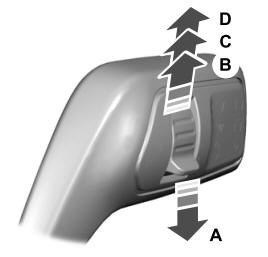
A - Single wipe.
