
Kia Picanto: Rear Cross-Traffic Collision-Avoidance Assist (RCCA): (if equipped) / Rear Cross-Traffic Collision-Avoidance Assist settings
Rear Cross-Traffic Safety
 |
 |
A: Driver Assistance
With the Kia Picanto switched on, select User Settings > Driver Assistance > Parking Safety > Rear Cross-Traffic Safety on the instrument cluster, or Setup > Vehicle > Driver Assistance > Parking Safety > Rear Cross-Traffic Safety on the infotainment system.
WARNING
Rear Cross-Traffic Collision-Avoidance Assist switches on automatically whenever the vehicle is restarted. If Rear Cross-Traffic Safety is switched off after restart, stay aware of surrounding traffic and manoeuvre with care.
Warning Methods
|
|
A: Driver Assistance
Adjust Warning Methods while the vehicle is switched on. In the instrument cluster settings, select User Settings > Driver Assistance > Warning Methods. On the infotainment system, select Setup > Vehicle > Driver Assistance > Warning Methods. The available setting is:
-
Warning Volume: Adjusts the volume of the audible warning.
TIP
-
A change to Warning Methods may affect several driver assistance functions. Check the settings for each function and adjust them as needed.
-
After the vehicle is restarted, Warning Methods retains the most recently selected setting.
-
This setting menu may not be available on every vehicle specification.
 Rear Cross-Traffic Collision-Avoidance Assist (RCCA): (if equipped)
When the Kia Picanto is reversing, Rear Cross-Traffic Collision-Avoidance Assist monitors for vehicles approaching
from the left or right behind the vehicle...
 Rear Cross-Traffic Collision-Avoidance Assist operation
When the Kia Picanto is reversing, Rear Cross-Traffic Collision-Avoidance Assist responds according to the detected
collision risk. It may provide:
A collision warning
..
Other information:
Ford Explorer 2020-2026 Service Manual: Description and Operation - High Voltage Battery, Mounting and Cables - Component Location
..
Ford Explorer 2020-2026 Service Manual: Removal and Installation - Fuel Pump Driver Module (FPDM)
Removal All Vehicles NOTE: The fuel pump driver module is located on the bottom side of the left front floor panel, above the sound insulation panel. For fuel pump driver module component location view. Refer to: Fuel Charging and Controls - Component Location (303-04A Fuel Charging and Controls - 2...
Categories
- Manuals Home
- 6th Generation Explorer Owners Manual
- 6th Generation Explorer Service Manual
- General Service Information
- Body and Paint
- Description and Operation - Jacking and Lifting - Overview
- New on site
- Most important about car
Windshield Wipers
 Push the lever up or down to operate
the windshield wipers.
Push the lever up or down to operate
the windshield wipers.
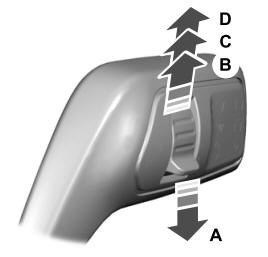
A - Single wipe.
