
Ford Explorer: Vehicle Care / Repairing Minor Paint Damage
Ford Explorer 2020-2026 Owners Manual / Vehicle Care / Repairing Minor Paint Damage
Authorized dealers have touch-up paint to match your vehicle’s color. Your vehicle color code is printed on a sticker on the front, left-hand side door jamb. Take your color code to your authorized dealer to make sure you get the correct color.
Before repairing minor paint damage, use a cleaner such as Motorcraft Bug and Tar Remover to remove particles such as bird droppings, tree sap, insect deposits, tar spots, road salt and industrial fallout.
Always read the instructions before using cleaning products.
 Cleaning Leather Seats
Note: Follow the same procedure as cleaning leather seats for cleaning
leather instrument panels and leather interior trim surfaces.
For routine cleaning, wipe the surface with a soft, damp cloth a..
 Cleaning the Wheels
Regularly clean them with a wheel cleaner. We recommend that you use Ford
approved wheel cleaner if available.
Remove dirt and brake dust with a sponge...
Other information:
Ford Explorer 2020-2026 Service Manual: General Procedures - Driveshaft Angle Measurement
Check NOTE: Prior to checking driveline angularity, inspect the U-joints for correct operation. NOTE: An incorrect driveline angle can cause a vibration or shudder. NOTE: Driveline angularity is the angular relationship between the engine crankshaft, the driveshaft and the rear axle pinion...
Ford Explorer 2020-2026 Service Manual: Removal and Installation - Glove Compartment
Removal NOTE: Removal steps in this procedure may contain installation details. Push the stop tabs inwards and fully lower the glove compartment. Remove the glove compartment check strap. Remove the bolts and the glove compartment assembly...
Categories
- Manuals Home
- 6th Generation Explorer Owners Manual
- 6th Generation Explorer Service Manual
- Interior Trim and Ornamentation
- Description and Operation - Identification Codes
- Automatic Transmission
- New on site
- Most important about car
Locking and Unlocking
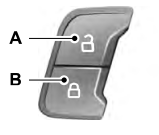
You can use the power door lock control or the remote control to lock and unlock your vehicle.
Power Door Locks
The power door lock control is on the driver and front passenger door panels.

Copyright © 2026 www.foexplorer.com