
Ford Explorer: Second Row Seats / Removal and Installation - Second Row Easy Entry Power Release Actuator
Ford Explorer 2020-2025 Service Manual / Body and Paint / Body and Paint / Second Row Seats / Removal and Installation - Second Row Easy Entry Power Release Actuator
Removal
NOTE: LH rear seat shown, RH rear seat similar.
NOTE: Removal steps in this procedure may include installation details.
-
Remove the second row single seat backrest cover.
Refer to: Second Row Single Seat Backrest Cover - Vehicles With: Second Row Captain Chairs (501-10B Second Row Seats, Removal and Installation).
-
Disconnect the second row easy entry power release actuator electrical connector.
.jpg) |
-
Loosen the second row easy entry power release actuator screws.
Torque: 27 lb.in (3 Nm)
.jpg) |
-
Remove the second row easy entry power release actuator.
-
Slide the second row easy entry power release actuator up and out of the backrest frame.
-
Disconnect the second row easy entry power release actuator cable from the bracket and actuator.
-
Slide the second row easy entry power release actuator up and out of the backrest frame.
.jpg) |
Installation
-
To install, reverse the removal procedure.
 Removal and Installation - Second Row Easy Entry Manual Release Cable
Removal
NOTE:
LH rear seat shown, RH rear seat similar.
NOTE:
Removal steps in this procedure may include installation details.
NOTE:
Follow the unique instructions or graphic for..
 Removal and Installation - Second Row Easy Entry Power Release Cable
Removal
NOTE:
LH rear seat shown, RH rear seat similar.
NOTE:
Removal steps in this procedure may include installation details.
Remove the second row easy entry power release actu..
Other information:
Ford Explorer 2020-2025 Service Manual: Removal and Installation - Second Row Easy Entry Power Release Cable
Removal NOTE: LH rear seat shown, RH rear seat similar. NOTE: Removal steps in this procedure may include installation details. Remove the second row easy entry power release actuator. Refer to: Second Row Easy Entry Power Release Actuator (501-10B Second Row Seats, Removal and Installation)...
Ford Explorer 2020-2025 Service Manual: Removal and Installation - Trailer Module (TRM)
Removal NOTE: Removal steps in this procedure may contain installation details. NOTE: This step is only necessary if the TRM is being replaced. Using a diagnostic scan tool, begin the PMI process for the TRM following the on-screen instructions...
Categories
- Manuals Home
- 6th Generation Explorer Owners Manual
- 6th Generation Explorer Service Manual
- Removal and Installation - Liftgate Trim Panel
- Description and Operation - Identification Codes
- Body and Paint
- New on site
- Most important about car
Windshield Wipers
 Push the lever up or down to operate
the windshield wipers.
Push the lever up or down to operate
the windshield wipers.
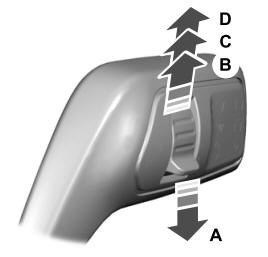
A - Single wipe.

Copyright © 2025 www.foexplorer.com