
Ford Explorer: Instrument Panel and Console / Removal and Installation - Overhead Console
Ford Explorer 2020-2026 Service Manual / Body and Paint / Body and Paint / Instrument Panel and Console / Removal and Installation - Overhead Console
Special Tool(s) / General Equipment
| Interior Trim Remover |
Removal
-
Starting at the back, release the clips and remove the overhead console.
-
Disconnect the electrical connectors.
Use the General Equipment: Interior Trim Remover
-
Disconnect the electrical connectors.
.jpg) |
Installation
-
To install, reverse the removal procedure.
 Removal and Installation - Instrument Panel Upper Section
Special Tool(s) /
General Equipment
Interior Trim Remover
Removal
NOTE:
Removal steps in this procedure may contain installation details...

Other information:
Ford Explorer 2020-2026 Service Manual: Removal and Installation - Thermostatic Expansion Valve - 2.3L EcoBoost (201kW/273PS)
Removal NOTICE: During the removal of components, cap, tape or otherwise appropriately protect all openings to prevent the ingress of dirt or other contamination. Remove protective materials prior to installation. NOTE: Removal steps in this procedure may contain installation details...
Ford Explorer 2020-2026 Owners Manual: Rear Parking Aid
WARNING: The system may not detect objects with surfaces that absorb reflection. Always drive with due care and attention. Failure to take care may result in a crash. WARNING: The system may not detect small or moving objects, particularly those close to the ground...
Categories
- Manuals Home
- 6th Generation Explorer Owners Manual
- 6th Generation Explorer Service Manual
- Description and Operation - Identification Codes
- Traction Control
- Description and Operation - Jacking and Lifting - Overview
- New on site
- Most important about car
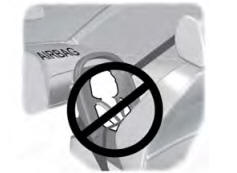
Children and Airbags
WARNING: Airbags can kill or injure a child in a child restraint. Never place a rear-facing child restraint in front of an active airbag. If you must use a forward-facing child restraint in the front seat, move the seat upon which the child restraint is installed all the way back.

Copyright © 2026 www.foexplorer.com