
Ford Explorer: Instrument Panel and Console / Removal and Installation - Glove Compartment
Ford Explorer 2020-2026 Service Manual / Body and Paint / Body and Paint / Instrument Panel and Console / Removal and Installation - Glove Compartment
Removal
NOTE: Removal steps in this procedure may contain installation details.
-
Push the stop tabs inwards and fully lower the glove compartment.
-
Remove the glove compartment check strap.
-
Remove the glove compartment check strap.
.jpg) |
-
Remove the bolts and the glove compartment assembly.
-
Disconnect the electrical connector.
Torque: 22 lb.in (2.5 Nm)
-
Disconnect the electrical connector.
.jpg) |
Installation
-
To install, reverse the removal procedure.
 Removal and Installation - Floor Console
Removal
All vehicles except Police
NOTE:
Removal steps in this procedure may contain installation details.
Remove the front seats.
Refer to: Front Seat (501-10A Front Seats, Removal..
 Removal and Installation - Instrument Panel
Special Tool(s) /
General Equipment
Flat Headed Screw Driver
Interior Trim Remover
Removal
All vehicles
NOTE:
Removal steps in this procedure may contain installation details...
Other information:
Ford Explorer 2020-2026 Owners Manual: Special Operating Conditions Scheduled Maintenance
If you operate your vehicle primarily in any of the following conditions, you need to perform extra maintenance as indicated. If you operate your vehicle occasionally under any of these conditions, it is not necessary to perform the extra maintenance...
Ford Explorer 2020-2026 Service Manual: Removal and Installation - Oil Pan
Special Tool(s) / General Equipment 205-153 (T80T-4000-W) Handle 303-096 (T74P-6150-A) Installer, Camshaft Front Oil SealTKIT-2009TC-F 303-103 (T74P-6375-A) Holding Tool, FlywheelT74P-77000-ATKIT-2009TC-F 303-1252Stretchy Belt Remover/ Installer ToolTKIT-2006UF-FLMTKIT-2006UF-ROW 303-1521Alignment Tool, Crankshaft Position SensorTKIT-2010C-FLM 303-16..
Categories
- Manuals Home
- 6th Generation Explorer Owners Manual
- 6th Generation Explorer Service Manual
- Removal and Installation - Front Halfshaft Speed Sensor
- Automatic Transmission - 10-Speed Automatic Transmission – 10R60
- Description and Operation - Identification Codes
- New on site
- Most important about car
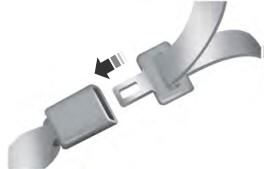
Fastening the Seatbelts
The front outboard and rear safety restraints in the vehicle are combination lap and shoulder belts.

Copyright © 2026 www.foexplorer.com