
Ford Explorer: Seatbelts / Fastening the Seatbelts
Ford Explorer 2020-2026 Owners Manual / Seatbelts / Fastening the Seatbelts
The front outboard and rear safety restraints in the vehicle are combination lap and shoulder belts.
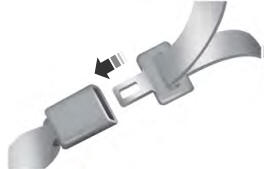
- Insert the belt tongue into the proper buckle (the buckle closest to the
direction the tongue is coming from) until you hear a snap and feel it latch.
Make sure that you securely fasten the tongue in the buckle.
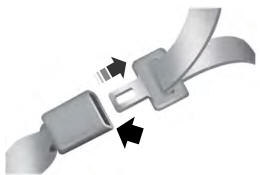
- To unfasten, press the release button and remove the tongue from the buckle.
 Principle of Operation
WARNING: Always drive and ride with your seatback upright and the lap belt
snug and low across the hips.
WARNING: Children must always be properly restrained...
 Using Seatbelts During Pregnancy
WARNING: Always ride and drive with your seatback upright and properly
fasten your seatbelt. Fit the lap portion of the seatbelt snugly and low across
the hips...
Other information:
Ford Explorer 2020-2026 Service Manual: Diagnosis and Testing - Diagnostic Strategy
Overview The diagnostic process for each transmission concern will vary depending on the symptoms and condition of the vehicle. The diagnostic process below is an efficient method to collect as much data as possible about the concern before performing a repair or removing the transmission from the vehicle for teardown and further inspection...
Ford Explorer 2020-2026 Service Manual: Removal and Installation - Exhaust Gas Recirculation (EGR) Outlet Tube
Removal NOTE: Removal steps in this procedure may contain installation details. Remove the EGR inlet tube. Refer to: Exhaust Gas Recirculation (EGR) Inlet Tube (303-08A Engine Emission Control - 2.3L EcoBoost (201kW/273PS), Removal and Installation)...
Categories
- Manuals Home
- 6th Generation Explorer Owners Manual
- 6th Generation Explorer Service Manual
- General Procedures - Brake Service Mode Activation and Deactivation
- General Procedures - Transmission Fluid Drain and Refill
- Engine - 2.3L EcoBoost (201kW/273PS)
- New on site
- Most important about car
Locking and Unlocking
You can use the power door lock control or the remote control to lock and unlock your vehicle.
Power Door Locks
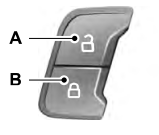
The power door lock control is on the driver and front passenger door panels.

Copyright © 2026 www.foexplorer.com