
Ford Explorer: Electronic Engine Controls - 2.3L EcoBoost (201kW/273PS) / Removal and Installation - Boost Pressure Sensor
Ford Explorer 2020-2026 Service Manual / Powertrain / Engine / Electronic Engine Controls - 2.3L EcoBoost (201kW/273PS) / Removal and Installation - Boost Pressure Sensor
Removal
NOTE: Removal steps in this procedure may contain installation details.
-
Remove the LH headlamp assembly.
Refer to: Headlamp Assembly (417-01 Exterior Lighting, Removal and Installation).
-
Disconnect the electrical connector. Remove the retainer and the turbocharger boost pressure sensor.
Torque: 53 lb.in (6 Nm)
.jpg) |
Installation
-
To install, reverse the removal procedure.
 Removal and Installation - Powertrain Control Module (PCM)
Special Tool(s) /
General Equipment
Ford Diagnostic Equipment
Removal
NOTE:
Removal steps in this procedure may contain installation details...
 Removal and Installation - Turbocharger Bypass Valve
Removal
NOTE:
Removal steps in this procedure may contain installation details.
Disconnect the electrical connector and harness retainers...
Other information:
Ford Explorer 2020-2026 Owners Manual: Information Messages
Note: Depending on your vehicle options and instrument cluster type, not all of the messages will display or be available. Certain messages may be abbreviated or shortened depending upon which cluster type you have. Press the OK button to acknowledge and remove some messages from the information display...
Ford Explorer 2020-2026 Owners Manual: Switching Adaptive Cruise Control On and Off
The cruise controls are on the steering wheel. See Cruise Control. Switching Adaptive Cruise Control On Press to set the system in standby mode. The indicator, current gap setting and set speed appear in the information display. Switching Adaptive Cruise Control Off Press when the system is in standby mode, or switch the ignition off...
Categories
- Manuals Home
- 6th Generation Explorer Owners Manual
- 6th Generation Explorer Service Manual
- Electric Parking Brake
- Removal and Installation - Front Halfshaft Speed Sensor
- Traction Control
- New on site
- Most important about car
Windshield Wipers
 Push the lever up or down to operate
the windshield wipers.
Push the lever up or down to operate
the windshield wipers.
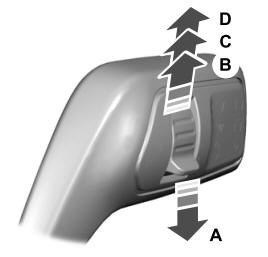
A - Single wipe.

Copyright © 2026 www.foexplorer.com