
Ford Explorer: Rear Drive Axle/Differential / Removal and Installation - Axle Assembly
Ford Explorer 2020-2026 Service Manual / Chassis / Driveline / Rear Drive Axle/Differential / Removal and Installation - Axle Assembly
Special Tool(s) / General Equipment
| Transmission Jack |
Removal
NOTE: Removal steps in this procedure may contain installation details.
-
Drain the rear differential fluid.
Refer to: Differential Draining and Filling (205-02 Rear Drive Axle/Differential, General Procedures).
-
Remove the rear halfshafts.
Refer to: Rear Halfshaft (205-05 Rear Drive Halfshafts, Removal and Installation).
-
Remove the rear driveshaft.
Refer to: Rear Driveshaft (205-01 Driveshaft, Removal and Installation).
-
Disconnect and position the axle assembly vent hose aside.
.jpg) |
-
Using the transmission jack support the rear axle assembly.
Use the General Equipment: Transmission Jack
.jpg) |
-
Remove and discard the rear axle housing support front bolts.
Torque: 129 lb.ft (175 Nm)
.jpg) |
-
If equipped.
Remove and discard the rear axle housing support rear bolt.
Torque: 148 lb.ft (200 Nm)
.jpg) |
-
If equipped.
Remove and discard the rear axle housing support rear bolts.
Torque: 148 lb.ft (200 Nm)
.jpg) |
-
Gently down the transmission jack and remove the rear axle assembly.
Use the General Equipment: Transmission Jack
.jpg) |
Installation
-
To install, reverse the removal procedure.
 General Procedures - Ring Gear Backlash Adjustment
Special Tool(s) /
General Equipment
205-220Installer, Differential ShimTKIT-1985-FH
Dial Indicator
Copper Hammer
Adjustment
Remove the differential housing cover...
 Removal and Installation - Axle Housing Bushing
Special Tool(s) /
General Equipment
205-1066Installer, Bushing
Flat Headed Screw Driver
Removal
NOTE:
Only worn or damaged bushings need to be replaced...
Other information:
Ford Explorer 2020-2026 Owners Manual: Cup Holders, Center Console & Overhead Console
Cup Holders Note: Stow items in the cupholders carefully as items may become loose during hard braking, acceleration or crashes, including hot drinks which may spill. Center Console Carefully stow items in the center console as items may become loose during hard braking, acceleration or crashes...
Ford Explorer 2020-2026 Service Manual: Removal and Installation - Steering Column Opening Seal
Removal NOTE: Removal steps in this procedure may contain installation details. Remove the steering column upper shaft. Refer to: Steering Column Upper Shaft (211-04 Steering Column, Removal and Installation). Remove the cowl panel...
Categories
- Manuals Home
- 6th Generation Explorer Owners Manual
- 6th Generation Explorer Service Manual
- Driveline
- Description and Operation - Identification Codes
- Interior Trim and Ornamentation
- New on site
- Most important about car
Locking and Unlocking
You can use the power door lock control or the remote control to lock and unlock your vehicle.
Power Door Locks
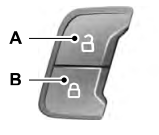
The power door lock control is on the driver and front passenger door panels.

Copyright © 2026 www.foexplorer.com