
Ford Explorer: Remote Control / Memory Feature (If Equipped)
Ford Explorer 2020-2026 Owners Manual / Keys and Remote Controls / Remote Control / Memory Feature (If Equipped)
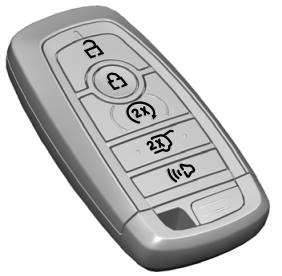
You can use the remote control to recall memory positions.
If programmed to a pre-set position, the remote control recalls memory positions when you unlock your vehicle. If you have the easy entry and exit feature enabled and the ignition is off, the seat moves to the easy entry position. The seat moves to the driver memory position when you switch the ignition on.
Linking a Preset Position to Your Remote Control or Intelligent Access Key
See Memory Function.
 Replacing the Battery
Note: Refer to local regulations when disposing of transmitter batteries.
Note: Do not wipe off any grease on the battery terminals or on the back
surface of the circuit board...
 Car Finder
Press the button twice within three
seconds. The horn sounds and the direction indicators flash. We recommend you use
this method to locate your vehicle, rather than using the panic alarm...
Other information:
Ford Explorer 2020-2026 Service Manual: General Procedures - Charge Air Cooler (CAC) Cleaning
Cleaning Remove the CAC. Refer to: Charge Air Cooler (CAC) (303-12A Intake Air Distribution and Filtering - 2.3L EcoBoost (201kW/273PS), Removal and Installation). Remove the Turbocharger Boost Pressure Sensor from the CAC by removing the screw and gently pulling the sensor from the CAC...
Ford Explorer 2020-2026 Service Manual: Description and Operation - Third Row Seats - Overview
Overview Third Row Power Fold Seats Pressing and releasing the power fold seat control switch (located in the rear cargo area on the RH loadspace trim panel) causes the corresponding third row seat backrest(s) to fold forward for additional cargo space...
Categories
- Manuals Home
- 6th Generation Explorer Owners Manual
- 6th Generation Explorer Service Manual
- Driveline
- Auxiliary Power Points
- Traction Control
- New on site
- Most important about car
Intelligent Access Key
Note: You may not be able to shift out of park (P) unless the intelligent access key is inside your vehicle.

Copyright © 2026 www.foexplorer.com