
Ford Explorer: Remote Control / Car Finder
 Press the button twice within three
seconds. The horn sounds and the direction indicators flash. We recommend you use
this method to locate your vehicle, rather than using the panic alarm.
Press the button twice within three
seconds. The horn sounds and the direction indicators flash. We recommend you use
this method to locate your vehicle, rather than using the panic alarm.
 Memory Feature (If Equipped)
You can use the remote control to recall memory positions.
If programmed to a pre-set position, the remote control recalls memory positions
when you unlock your vehicle...
 Sounding the Panic Alarm
Note: The panic alarm only operates when the ignition is off.
Press the button to sound the panic
alarm. Press the button again or switch the ignition on to turn it off...
Other information:
Ford Explorer 2020-2026 Service Manual: Removal and Installation - Climate Control Housing
Special Tool(s) / General Equipment Interior Trim Remover Removal NOTE: Removal steps in this procedure may contain installation details. Release the clips and remove the trim panel. Remove the bolts, release the clips and remove the display...
Ford Explorer 2020-2026 Service Manual: Removal and Installation - Brake Disc Shield
Removal NOTE: Removal steps in this procedure may contain installation details. Remove the wheel bearing and wheel hub. Refer to: Wheel Bearing and Wheel Hub (204-02 Rear Suspension, Removal and Installation). Remove the 3 bolts and the brake disc shield...
Categories
- Manuals Home
- 6th Generation Explorer Owners Manual
- 6th Generation Explorer Service Manual
- Description and Operation - Identification Codes
- Engine - 2.3L EcoBoost (201kW/273PS)
- Interior Trim and Ornamentation
- New on site
- Most important about car
Locking and Unlocking
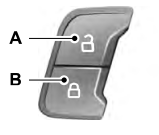
You can use the power door lock control or the remote control to lock and unlock your vehicle.
Power Door Locks
The power door lock control is on the driver and front passenger door panels.

Copyright © 2026 www.foexplorer.com