Kia Picanto: LCD display / User Settings mode : (if equipped)
|
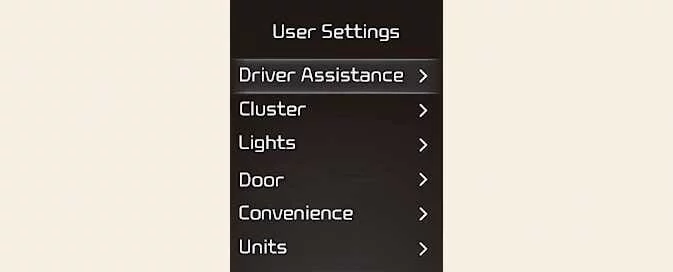
User Settings mode allows you to personalise supported functions of your Kia Picanto, including the instrument cluster, door locks and lighting. Select the relevant menu to review the available options and change a setting.
The menus and choices displayed depend on the equipment and functions fitted to your vehicle. Some settings described below may therefore be unavailable or presented differently.
Settings only available in PARK/Settings only available with parking brake engaged
This message appears if you attempt to adjust User Settings while driving or before the required parking conditions have been met.
-
Automatic Transmission
Park the vehicle, apply the parking brake and move the selector to P (Park) before changing User Settings. Complete these preparations so that you can give the menus your attention while the vehicle is stationary.
-
Manual Transmission
Stop the vehicle and engage the parking brake before adjusting User Settings. Make the required changes before resuming your journey.
1. Driver Assistance (if equipped)
| Item | Available settings and explanation |
|---|---|
| Speed Limit |
|
| Warning Methods |
|
| Driver Attention Warning |
Use this entry to configure the available departure alert setting. Refer to “Driver Attention Warning (DAW)” for its operation and limitations. |
| Driving Safety |
For detailed guidance, refer to “Forward Collision-Avoidance Assist (FCA) (Front Camera Only)” or “Forward Collision-Avoidance Assist (FCA) (Sensor Fusion)”, according to the system fitted.
See “Lane Keeping Assist (LKA)” for the relevant settings and operating information.
Refer to “Blind-Spot Collision-Avoidance Assist (BCA)” for further details.
See “Safe Exit Warning (SEW)” for an explanation of this function. |
| Parking Safety |
Refer to “Rear Cross-Traffic Collision-Avoidance Assist (RCCA)” for operating guidance and system limitations. |
Driver Assistance menu content varies with the systems installed in your Kia Picanto. Refer to the individual system descriptions when selecting settings for the equipment fitted.
2. Cluster (if equipped)
| Item | Available settings and explanation |
|---|---|
| Theme Selection |
|
| AUTO STOP Timer |
|
| Wiper/Lights Display |
Enable or disable the Wiper/Lights Display function. |
| Traffic Signs |
Switch the Traffic Signs function on or off through this setting. |
| Icy Road Warning |
Enable or disable the Icy Road Warning function. |
| Cluster Voice Guidance Volume |
|
| Welcome Sound |
Enable or disable the Welcome Sound function. |
The cluster options shown depend on the display and functions fitted to the vehicle. Only the settings available on your instrument cluster can be selected.
3. Lights (if equipped)
| Item | Available settings and explanation |
|---|---|
| Illumination |
|
| One Touch Turn Signal |
Refer to “Lighting” for further instructions on using the turn signals. |
| Headlight Delay |
Switch the Headlight Delay function on or off. |
| High Beam Assist |
Enable or disable High Beam Assist through this menu. See “High Beam Assist (HBA)” for information about its operation and limitations. |
The lighting settings available may differ according to the functions fitted to your vehicle. Use the menu entries displayed for your specification.
4. Door (if equipped)
| Item | Available settings and explanation |
|---|---|
| Automatically Lock |
|
| Automatically Unlock |
|
| Remote Window |
Enable or disable remote window control. |
The available locking, unlocking and window settings depend on the systems fitted to your Kia Picanto. Select the option that suits your preferred operation from those provided.
5. Convenience (if equipped)
| Item | Available settings and explanation |
|---|---|
| Rear Occupant Alert |
|
| Service Interval |
|
| Welcome Light |
Choose the condition that activates the welcome light function. |
| Welcome Mirror |
Select the preferred activation condition for the welcome mirror function. |
| Welcome Mirror/Light |
Choose when the combined welcome mirror and light function activates. |
| Auto Rear Wiper |
|
Convenience menu entries vary with vehicle equipment. The welcome mirror and lighting options shown will reflect the functions available on your vehicle.
8. Units (if equipped)
| Item | Available settings and explanation |
|---|---|
| Speed Unit |
Select the unit used to display vehicle speed. |
| Temperature Unit |
Choose Celsius or Fahrenheit for temperature readings. |
| Fuel Economy Unit |
Select the preferred format for fuel economy information. |
| Tyre Pressure Unit |
Choose the unit used for tyre pressure information. |
The unit settings available depend on the information and functions supported by your vehicle. Review the selected units when interpreting the corresponding readings.
9. Reset
| Item | Explanation |
|---|---|
| Reset |
Use Reset to restore the User Settings menus to their factory defaults. All settings within this mode are reset except the language and service interval, which retain their existing selections. |
The menus affected by this reset depend on the functions fitted to your vehicle and the User Settings entries available on its display.
 Master warning mode
The master warning indication alerts the driver to vehicle conditions ..
 Warning messages
Warning messages appear on the LCD screen in the centre of the instrument cluster to draw your attention to vehicle
conditions, operating requirements or faults...
Other information:
Ford Explorer 2020-2026 Service Manual: Removal and Installation - Fender Apron Panel
Special Tool(s) / General Equipment 6.5 mm Drill Bit Resistance Spotwelding Equipment Rivet Gun Belt Sander Torx Bit Socket Hot Air Gun 8 mm Drill Bit MIG/MAG Welding Equipment Spot Weld Drill Bit Locking Pliers Materials Name Specification Metal Bonding AdhesiveTA-1, TA-1-B, 3M™ 08115, LORD Fusor® 108B - Seam SealerTA..
Kia Picanto 2024-2026 Owner's Manual: Suitability of each seating position for belted & ISOFIX Child Restraint Systems (CRS) according to UN regulations (Except Europe)
This information is intended for vehicle users and Child Restraint System manufacturers. The table identifies seating-position suitability for the categories of belted and ISOFIX restraints listed for the Kia Picanto outside Europe. Read the relevant entry together with its footnotes, as some installations require specific seat adjustments or belt equipment...
Categories
- Manuals Home
- 6th Generation Explorer Owners Manual
- 6th Generation Explorer Service Manual
- Driveline
- Automatic Transmission - 10-Speed Automatic Transmission – 10R60
- Interior Trim and Ornamentation
- New on site
- Most important about car
Driver and Passenger Airbags
WARNING: Do not place your arms on the airbag cover or through the steering wheel. Failure to follow this instruction could result in personal injury.
WARNING: Keep the areas in front of the airbags free from obstruction. Do not affix anything to or over the airbag covers. Objects could become projectiles during airbag deployment or in a sudden stop. Failure to follow this instruction could result in personal injury or death.
WARNING: Airbags can kill or injure a child in a child restraint. Never place a rear-facing child restraint in front of an active airbag. If you must use a forward-facing child restraint in the front seat, move the seat upon which the child restraint is installed all the way back.