Kia Picanto: LCD display / Warning messages
Warning messages appear on the LCD screen in the centre of the instrument cluster to draw your attention to vehicle conditions, operating requirements or faults. Read the message displayed in your Kia Picanto and follow the guidance for that particular condition.
The appearance and availability of these warnings depend on the instrument cluster fitted to the vehicle. Some clusters present the information differently, while others may not display certain messages.
A warning may appear as a symbol, a combination of a symbol and text, or text alone. The format can vary even when the underlying warning refers to the same condition.
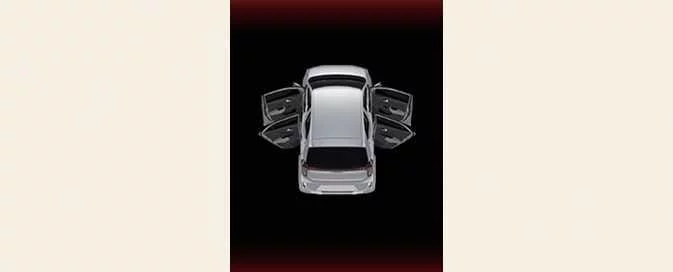
Door, bonnet, tailgate open: (if equipped)
|
-
This warning identifies which door, the bonnet or the tailgate is open. Check the indicated opening and make sure it is securely closed.
Sunroof open: (if equipped)

|
-
This reminder appears when you switch off the engine while the sunroof remains open. Check the sunroof and close it before leaving the vehicle.
Shift to P (for smart key system and Automatic Transmission): (if equipped)
-
This message appears if you attempt to switch off the engine while the transmission selector is not in P (Park). It prompts you to select the Park position.
-
Under these conditions, the ENGINE START/STOP button changes to ACC. Pressing the button again changes it to ON, rather than completing the normal switch-off sequence.
Low Key Battery (for smart key system): (if equipped)
-
This warning appears when the ENGINE START/STOP button changes to OFF and the smart key battery is discharged. It alerts you to the condition of the battery inside the key.
Press START button whilst turning wheel (for smart key system): (if equipped)
-
This message appears if the steering wheel does not unlock normally when you press the ENGINE START/STOP button.
-
Press the ENGINE START/STOP button while moving the steering wheel to the right and left, as directed by the message, to help release the steering lock.
Steering wheel not locked (for smart key system): (if equipped)
-
This warning appears if the steering wheel does not lock when the ENGINE START/STOP button changes to OFF. It indicates that the expected locking action has not taken place.
Check Steering Wheel Lock System (for smart key system): (if equipped)
-
This message appears when the steering wheel fails to lock normally as the ENGINE START/STOP button changes to OFF. The warning concerns the operation of the steering wheel locking system.
Press brake pedal to start engine (for smart key system and Automatic Transmission/Automated Manual Transmission): (if equipped)
-
This reminder appears after repeated presses of the ENGINE START/STOP button without the brake pedal depressed cause the button to enter ACC twice.
-
Depress the brake pedal when attempting to start the engine. Pressing the button alone changes the ignition state without meeting the pedal requirement for starting.
Press clutch pedal to start engine (for smart key system and Manual Transmission): (if equipped)
-
This reminder appears after repeated presses of the ENGINE START/STOP button without the clutch pedal depressed cause the button to enter ACC twice.
-
Depress the clutch pedal to start the engine. The message identifies the pedal input required for the starting procedure.
Key not in vehicle (for smart key system): (if equipped)
-
This warning appears when a door is opened or closed with the ENGINE START/STOP button in ACC or ON and the smart key is not inside the vehicle. When the door is closed, an audible warning also sounds for approximately five seconds.
-
Keep the smart key with you and make sure it is available inside the vehicle when required for operation. This message alerts you that the key is absent.
Key not detected (for smart key system): (if equipped)
-
If you press the ENGINE START/STOP button without a smart key present, or the vehicle cannot detect the key, this message appears for 10 seconds. The immobiliser indicator light also flashes for 10 seconds to accompany the warning.
Press START button again (for smart key system): (if equipped)
-
This warning appears if a problem with the ENGINE START/STOP button system prevents the button from operating normally.
-
Pressing the ENGINE START/STOP button once more may allow the engine to start.
-
If the warning returns every time you press the button, have your Kia Picanto inspected by a professional workshop. Kia recommends visiting an authorised Kia dealer or service partner.
Press START button with key (for smart key system): (if equipped)
-
This instruction appears if you press the ENGINE START/STOP button while the Key not detected message is already displayed. It directs you to use the smart key itself to press the start button.
-
The immobiliser indicator light flashes while this warning is displayed.
Check BRAKE SWITCH fuse (for smart key system and Automatic Transmission/Automated Manual Transmission): (if equipped)
-
This message appears if the brake switch fuse is disconnected, indicating that the fuse requires attention.
-
Replace the fuse with a new one. If replacement is not possible, the engine can be started by pressing and holding the ENGINE START/STOP button for 10 seconds with the ignition in ACC.
Shift to P or N to start engine (for smart key system and Automatic Transmission): (if equipped)
-
This warning appears if you attempt to start the engine while the selector is in a position other than P (Park) or N (Neutral). Select an appropriate starting position before trying again.
NOTE
The engine can be started with the automatic transmission in N (Neutral). For safety, however, Kia recommends starting with the selector in P (Park).
Shift to N to start engine (for smart key system and Automated Manual Transmission): (if equipped)
-
This warning appears if you try to start the engine without the automated manual transmission selector in N (Neutral). Move the selector to Neutral before attempting to start.
NOTE
For the automated manual transmission, the engine can be started with the selector in N (Neutral).
Engine overheated: (if equipped)
-
This warning appears when the engine coolant temperature exceeds 120°C (248°F). It indicates that the engine is overheating and may suffer damage if operation continues.
If the vehicle overheats, follow the instructions in “If the engine overheats” for the appropriate response.
Low fuel: (if equipped)
This message appears when the fuel tank is nearly empty, alerting you that the remaining fuel supply is low.
The low fuel warning light on the instrument cluster also illuminates when this message is displayed.
Locate the nearest suitable filling station and refuel as soon as possible. Plan a safe stop rather than continuing until the tank is empty.
Low engine oil
-
This warning appears when the engine oil level is insufficient and requires attention.
-
Replenish the engine oil as required, following the checking and filling procedure and the maintenance requirement below.
Refer to “Engine oil” for detailed instructions on checking the level and adding the specified oil.
WARNING
When the engine oil level warning appears, check whether the oil replacement schedule in the Owner’s Manual has been followed before simply adding oil. If the required oil change has not been carried out, the engine oil must be replaced first. Topping up does not take the place of an overdue oil change.
Engine oil change due soon. Reset oil life after oil change
-
This message appears when the remaining engine oil life reaches 5% or less, indicating that an oil change is approaching.
-
Have the engine oil replaced by an authorised Kia dealer. After the oil change, reset the remaining oil life through Convenience > Oil Change Reminder in the instrument cluster’s User Settings menu, or through Vehicle > Cluster > Oil Change Reminder in the infotainment system’s Settings menu.
See “Engine oil” for further information about oil replacement and the reminder function.
Engine oil change due now. Reset oil life after oil change
-
This message appears when the remaining engine oil life reaches 1% or less, indicating that an oil change is now due.
-
Have the engine oil replaced immediately by an authorised Kia dealer. Once the oil has been changed, reset the remaining oil life through Convenience > Oil Change Reminder in the instrument cluster’s User Settings menu, or Vehicle > Cluster > Oil Change Reminder in the infotainment system’s Settings menu.
Refer to “Engine oil” for the applicable servicing information and oil change reminder guidance.
Battery discharging due to external electrical devices: (if equipped)
Your Kia Picanto can detect battery discharge associated with excessive current drawn by unauthorised electrical accessories, such as a dash cam operating while the vehicle is parked. This condition may restrict functions such as ISG and can lead to battery discharge problems. Remove the external electrical devices and check whether the warning persists. If it continues after the accessories have been removed, have the vehicle inspected by a professional workshop. Kia recommends contacting an authorised Kia dealer or service partner.
 User Settings mode : (if equipped)
User Settings mode allows you to personalise supported functions of your Kia Picanto, including the in..

Other information:
Ford Explorer 2020-2026 Service Manual: Diagnosis and Testing - Parking Aid
Diagnostic Trouble Code (DTC) Chart Diagnostics in this manual assume a certain skill level and knowledge of Ford-specific diagnostic practices. REFER to: Diagnostic Methods (100-00 General Information, Description and Operation). Diagnostic Trouble Code Chart Module DTC Description Action IPMB B1303:..
Ford Explorer 2020-2026 Owners Manual: Interior Mirror
WARNING: Do not adjust the mirrors when your vehicle is moving. This could result in the loss of control of your vehicle, serious personal injury or death. Note: Do not clean the mirror housing or glass with harsh abrasives, fuel or other petroleum-based cleaning products...
Categories
- Manuals Home
- 6th Generation Explorer Owners Manual
- 6th Generation Explorer Service Manual
- General Service Information
- Interior Trim and Ornamentation
- Traction Control
- New on site
- Most important about car
Children and Airbags
WARNING: Airbags can kill or injure a child in a child restraint. Never place a rear-facing child restraint in front of an active airbag. If you must use a forward-facing child restraint in the front seat, move the seat upon which the child restraint is installed all the way back.