Kia Picanto: Keys / Smart key : (if equipped)
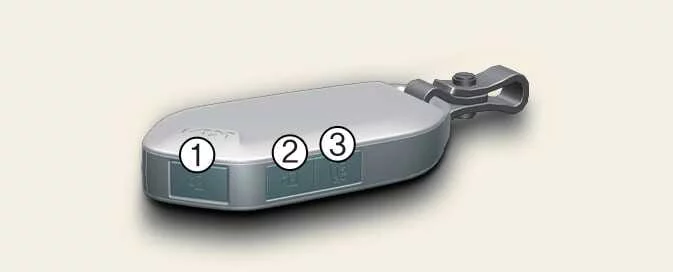
If equipped, the Kia Picanto smart key allows you to lock or unlock a door and start the engine without inserting a key. The buttons shown in the illustration provide remote locking, unlocking and tailgate access, while the detachable mechanical key provides a way to operate the door lock if the smart key cannot function normally.
|
Lock (1)
Press the lock button while all doors are closed to lock the doors. Make sure each door is fully closed before using the remote locking function.
The hazard warning lights flash once to confirm that all doors have been locked.
If a door, the bonnet or the tailgate remains open, the hazard warning lights will not provide this confirmation. After the lock button has been pressed, closing all doors, the bonnet and the tailgate will cause the lights to flash once.
Unlock (2)
Press the unlock button to unlock all doors, allowing access to the vehicle without operating the individual door locks.
The hazard warning lights flash twice to confirm that all doors have been unlocked.
If no door is opened within 30 seconds of pressing the unlock button, the doors lock again automatically. Open a door within this period when you intend to enter the vehicle.
Tailgate unlock (3)
Press and hold the tailgate button for longer than one second. Depending on the equipment fitted to your vehicle, this releases the tailgate lock or opens the tailgate.
Once the tailgate has been opened and then closed, it locks again automatically.
Mechanical key
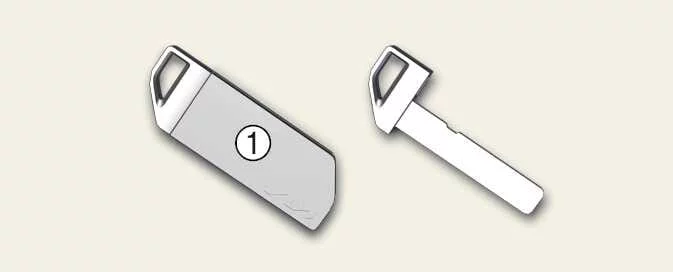
If the smart key battery is discharged or the smart key does not operate correctly, use the mechanical key to lock or unlock the door. This provides access to your Kia Picanto when electronic key operation is unavailable.
|
To expose the mechanical key for use, pull its protective cover, marked (1), away from the key. Keep the detachable key accessible so that it is available when needed.
WARNING
Ignition key and smart key — child safety
Leaving children unattended in a vehicle with an ignition key or smart key is dangerous. The risk remains even if the key is not inserted in the ignition switch, and when the ENGINE START/STOP button is in the ACC or ON position.
Children may imitate adults by inserting a key into the ignition switch or pressing the start button. Access to the ignition key or smart key can allow them to operate power windows and other controls, or even cause the vehicle to move. These actions can result in serious injury or death. Never leave keys inside the vehicle with unsupervised children, and never leave children unattended while the engine is running.
WARNING
Kia recommends obtaining replacement key parts from an authorised Kia dealer or service partner. An aftermarket key may prevent the ignition switch from returning to ON after it has been turned to START. If the switch remains in the starting position, the starter can continue operating, damaging the starter motor and potentially causing a fire through excessive current in the wiring.
Smart key precautions
TIP
-
If the smart key remains stationary for some time, its detection function pauses. Lift the key to reactivate detection before attempting to use it again.
-
Always install the smart key battery with the correct polarity. Reversing its orientation can cause the key to malfunction or the battery to discharge prematurely.
NOTE
-
The mechanical key is supplied as a separate, detachable item. Always carry it so that you can operate the door lock in an emergency, including when the smart key battery is discharged.
-
If you lose your smart key and have no registered key available, you will not be able to start the engine. Contact a professional workshop and arrange for the vehicle to be towed if necessary. Kia recommends assistance from an authorised Kia dealer or service partner.
-
A maximum of two smart keys can be registered to one vehicle. If a smart key is lost, contact an authorised Kia dealer or service partner for guidance on the appropriate replacement procedure.
-
The smart key may fail to operate normally in any of the following circumstances:
-
It is close to a strong radio transmitter, such as a radio station or an airport, where radio signals can interfere with smart key operation.
-
It is near a mobile two-way radio system or a mobile phone that can interfere with communication between the key and vehicle.
-
Another vehicle’s smart key is being operated nearby, potentially interfering with your key’s signal.
-
The key has been exposed to moisture or heat. The smart key is not completely waterproof, and contact with water, beverages or other moisture can damage its internal circuitry. Heat can also cause internal damage. Malfunctions resulting from these conditions are not eligible for warranty repair.
If the smart key does not operate correctly, use the mechanical key to lock or unlock the door and open or close it as needed. If the problem persists, Kia recommends contacting an authorised Kia dealer or service partner.
-
-
Carrying the smart key close to a mobile phone or smartphone can allow normal phone activity to interfere with or block the key’s signal. Interference is particularly relevant while making or receiving calls, exchanging text messages, or sending and receiving emails.
Avoid keeping the smart key and phone together in the same trouser or jacket pocket. Maintain sufficient distance between the devices when using the smart key.
-
Before attempting to lock or unlock the doors with the button on an exterior door handle, make sure all doors are closed. Check their position before operating the handle button.
-
Do not leave the smart key beside metallic objects, such as a golf bag or metal case. Keep the key clear of these objects when storing or using it.
-
Take the smart key with you whenever you leave your Kia Picanto. A key left unattended close to the vehicle can contribute to the vehicle battery becoming discharged.
-
The engine can be started only with a smart key registered to the vehicle. Starting is enabled when the vehicle recognises and matches the information stored in that key, so an unregistered key cannot be used as a substitute.
If your smart key is lost and no registered key is available, arrange for the vehicle to be towed to the nearest authorised Kia dealer for inspection and assistance.
-
When the smart key is carried with a bunch of other keys, pressure against its buttons can accidentally operate the door lock, door unlock or tailgate functions. Position and handle the key carefully to prevent unintended button presses.
-
Window tinting film, particularly metallised film, can interfere with reception of the smart key’s radio signal. This may reduce the distance over which the key operates reliably.
CAUTION
Keep the smart key away from water and other liquids. If liquid exposure causes the keyless entry system to malfunction or stop working, the resulting failure will not be covered by the manufacturer’s vehicle warranty.
 Remote key : (if equipped). Mechanical key
If your Kia Picanto is equipped with a remote key, its buttons allow you to lock or unlock the doors and release the
tailgate lock. The numbered controls in the illustration correspond to the fun..
 Immobiliser system: (if equipped)
Your Kia Picanto may be fitted with an electronic engine immobiliser designed to reduce the risk of unauthorised
vehicle use. The system checks the key’s identity before allowing the engine to ..
Other information:
Ford Explorer 2020-2026 Service Manual: General Procedures - Piston Ring End Gap
Special Tool(s) / General Equipment Feeler Gauge Check NOTE: Refer to the appropriate Section 303-01 for the specification. NOTE: Use care when fitting piston rings to avoid possible damage to the piston ring or the cylinder bore...
Ford Explorer 2020-2026 Service Manual: Description and Operation - Instrument Panel and Interior Switches Illumination - Overview
Overview Dimmable Illumination Dimmable illumination provides backlighting to switches and control components when the parking lamps are on. The instrument panel dimmer switch is used to increase or decrease the level of intensity for the dimmable backlit components...
Categories
- Manuals Home
- 6th Generation Explorer Owners Manual
- 6th Generation Explorer Service Manual
- Traction Control
- General Procedures - Brake Service Mode Activation and Deactivation
- Automatic Transmission
- New on site
- Most important about car
Driver and Passenger Airbags
WARNING: Do not place your arms on the airbag cover or through the steering wheel. Failure to follow this instruction could result in personal injury.
WARNING: Keep the areas in front of the airbags free from obstruction. Do not affix anything to or over the airbag covers. Objects could become projectiles during airbag deployment or in a sudden stop. Failure to follow this instruction could result in personal injury or death.
WARNING: Airbags can kill or injure a child in a child restraint. Never place a rear-facing child restraint in front of an active airbag. If you must use a forward-facing child restraint in the front seat, move the seat upon which the child restraint is installed all the way back.