
Kia Picanto: Automatic climate control system: (if equipped) / Manual heating and air conditioning
The Kia Picanto heating and cooling system can be operated manually using the controls other than the AUTO button. In manual operation, the system responds to your selections in the order in which you make them, allowing you to adjust individual climate settings.
If you press a button or turn a knob other than AUTO during automatic operation, you take manual control of that particular function. Any functions you have not selected continue to operate automatically.
-
Start the engine before adjusting the heating and cooling system.
-
Select the desired airflow mode to direct air towards the appropriate areas of the cabin.
For more effective heating or cooling, use the corresponding airflow setting shown below:
-
Heating:

-
Cooling:

-
-
Adjust the temperature control to the desired setting for cabin warmth or cooling.
-
Set the air intake control to the outside (fresh) air position to bring fresh air into the vehicle.
-
Select the desired fan speed to increase or reduce the amount of air flowing through the vents.
-
If air conditioning is required, switch on the air conditioning system.
To return all climate functions to automatic operation, press the AUTO button. The system will once again manage the settings automatically.
- Mode selection. Temperature control
- Air intake control. Fan speed control
- Air conditioning (A/C): (if equipped). OFF mode
 Automatic heating and air conditioning
Press the AUTO button to activate automatic operation. The Kia Picanto climate control
system then manages airflow mode, fan speed, air intake and air conditioning accordi..
 Mode selection. Temperature control
Mode selection
The mode selection button determines the direction of airflow through the ventilation system. Use it to choose which
cabin outlets deliver air...
Other information:
Ford Explorer 2020-2026 Service Manual: Diagnosis and Testing - Interior Lighting
Diagnostic Trouble Code (DTC) Chart Diagnostics in this manual assume a certain skill level and knowledge of Ford-specific diagnostic practices. REFER to: Diagnostic Methods (100-00 General Information, Description and Operation). Diagnostic Trouble Code Chart Module DTC Description Action BCM B1175:0..
Ford Explorer 2020-2026 Service Manual: Description and Operation - Front Suspension - Overview
Overview The RWD front suspension consists of the following components: Lower control arms Lower ball joints Stabilizer bar, bushings and links Ride height sensors Suspensions strut and spring assemblies Wheel bearings and wheel hubs Wheel knuckles Wheel studs The front suspension uses a MacPherson strut system...
Categories
- Manuals Home
- 6th Generation Explorer Owners Manual
- 6th Generation Explorer Service Manual
- Body and Paint
- General Procedures - Brake Service Mode Activation and Deactivation
- Automatic Transmission
- New on site
- Most important about car
Gauges
4 Inch Display
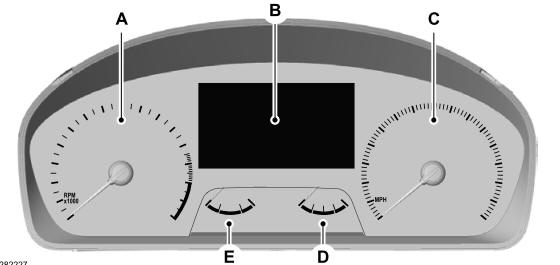
A - Tachometer.
B - Information display.
C - Speedometer.
D - Fuel gauge.
E - Engine coolant temperature gauge.
