
Kia Picanto: LCD display / Driving Assist mode : (if equipped). Setting. Service mode
Driving Assist mode : (if equipped). Setting

|
Driving Assist mode shows the operating status of the following assistance systems, where fitted:
-
Lane Keeping Assist: Displays the status of the lane-keeping assistance system.
-
Blind-Spot Collision-Avoidance Assist: Displays the status of the blind-spot collision-avoidance system.
-
Lane Following Assist: Displays the status of the lane-following assistance system.
For the meaning of each indication and the operating conditions of each feature, consult the corresponding section of the “Driver assistance guide”.
Setting
With Driving Assist mode displayed, press and hold the steering wheel OK button for more than one second to access the Driver Assistance settings.
WARNING
Do not change settings while driving. Navigating the settings can divert your attention from the road and cause an accident. Make adjustments only while the vehicle is stationary.
NOTE
The information and settings available depend on the driver assistance functions fitted to your vehicle. Some entries may therefore differ from those described here.
Service mode
Service mode provides reminders about scheduled maintenance, using the service interval entered in the system to show when the next service is due.
Service in
The display calculates the remaining distance or number of days until scheduled maintenance is required, based on the configured service interval.
When the remaining interval reaches 1,500 km (900 miles) or 30 days, the Service in message appears for several seconds each time the ignition switch or ENGINE START/STOP button is switched to ON.
Service required
If the previously entered service interval has elapsed without the maintenance reminder being reset, the Service required message appears for several seconds whenever the ignition switch or ENGINE START/STOP button is switched to ON.
To reset the service interval to the distance and number of days previously entered, use the following control:
-
Press and hold the OK (RESET) button for more than one second.
NOTE
The displayed maintenance distance and number of days may become inaccurate after either of the following interruptions to the electrical supply:
-
The battery cable is disconnected.
-
The battery becomes discharged.
 LCD display modes. Trip computer mode
LCD display modes
Table 1. Type A
Display controls
Mode
Trip Computer
User Settings
..
 Master warning mode
The master warning indication alerts the driver to vehicle conditions ..
Other information:
Ford Explorer 2020-2026 Service Manual: Removal and Installation - Electric Brake Booster (EBB)
Removal NOTE: Removal steps in this procedure may contain installation details. NOTE: The EBB and the ABS module are serviced as an assembly and should not be separated. NOTE: The PMI process must begin with the current ABS module installed...
Ford Explorer 2020-2026 Owners Manual: Cleaning the Interior
WARNING: Do not use cleaning solvents, bleach or dye on the vehicle's seatbelts, as these actions may weaken the belt webbing. WARNING: On vehicles equipped with seat-mounted airbags, do not use chemical solvents or strong detergents. Such products could contaminate the side airbag system and affect performance of the side airbag in a crash...
Categories
- Manuals Home
- 6th Generation Explorer Owners Manual
- 6th Generation Explorer Service Manual
- Interior Trim and Ornamentation
- Auxiliary Power Points
- Body and Paint
- New on site
- Most important about car
Gauges
4 Inch Display
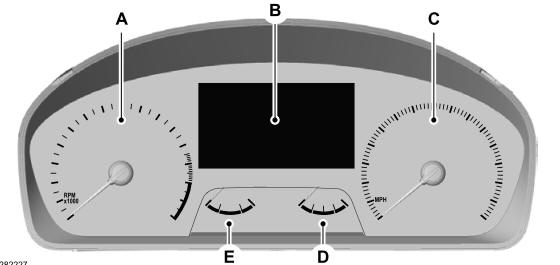
A - Tachometer.
B - Information display.
C - Speedometer.
D - Fuel gauge.
E - Engine coolant temperature gauge.
