
Ford Explorer: Drive Mode Control / Selecting a Drive Mode
Ford Explorer 2020-2026 Owners Manual / Drive Mode Control / Selecting a Drive Mode
Note: Drive mode changes may not be available when the ignition is off or when the engine is not running.
Note: Button icons shown may vary from your vehicle.
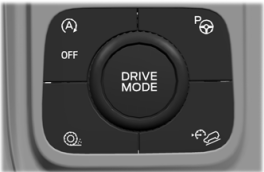
Rotate the drive mode dial on the center console to select or change a drive mode.
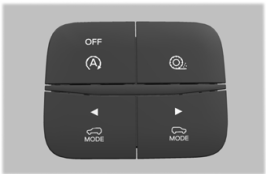
To select drive modes for RWD vehicles use the console mounted control.
 About Drive Mode Control
The system delivers a driving experience through a suite of sophisticated electronic
vehicle systems. These systems optimize steering, handling and powertrain response...
 Drive Modes
Deep Snow/Sand (If Equipped)
For deep snow or soft dry sand.
Eco
For efficient and responsible driving.
This mode helps deliver maximum fuel efficiency and increases driving range...
Other information:
Ford Explorer 2020-2026 Service Manual: Removal and Installation - Media Hub
Special Tool(s) / General Equipment Interior Trim Remover Removal Using a non marring tool position the USB hub out. Use the General Equipment: Interior Trim Remover Separate the USB connector and remove the USB bezel...
Ford Explorer 2020-2026 Service Manual: General Procedures - Seatbelt Maintenance
Inspection WARNING: All seatbelt components must be inspected and corrected as part of any collision repair. Inspect all seatbelt components as prescribed by Seatbelt Procedure After a Collision found in Section 501-20A General Procedures of this manual...
Categories
- Manuals Home
- 6th Generation Explorer Owners Manual
- 6th Generation Explorer Service Manual
- Auxiliary Power Points
- Electric Parking Brake
- Body and Paint
- New on site
- Most important about car
Windshield Wipers
 Push the lever up or down to operate
the windshield wipers.
Push the lever up or down to operate
the windshield wipers.
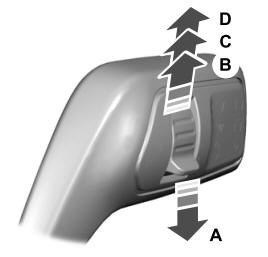
A - Single wipe.

Copyright © 2026 www.foexplorer.com