
Ford Explorer: Instrumentation, Message Center and Warning Chimes / Removal and Installation - Instrument Panel Cluster (IPC)
Ford Explorer 2020-2026 Service Manual / Electrical / Instrumentation and Warning Systems / Instrumentation, Message Center and Warning Chimes / Removal and Installation - Instrument Panel Cluster (IPC)
Special Tool(s) / General Equipment
| Interior Trim Remover |
Removal
All vehicles
NOTE: Removal steps in this procedure may contain installation details.
-
NOTE: If installing a new module, it is necessary to upload the module configuration information to the scan tool prior to removing the module. This information must be downloaded into the new module after installation.
Using a diagnostic scan tool, begin the PMI process for the IPC following the on-screen instructions. Record the odometer value from the original IPC. If the odometer value cannot be obtained from the IPC (display failure), perform the diagnostic routine. If the value cannot be obtained after the diagnostic routine, the customer should supply the approximate odometer value.
All except Police vehicles
-
Release the clips and remove the trim panel.
.jpg) |
-
-
Remove the bolts, release the clips and remove the display.
Torque: 71 lb.in (8 Nm)
-
Disconnect the electrical connector.
-
Remove the bolts, release the clips and remove the display.
.jpg) |
-
Release the clips and remove the center register trim panel.
Use the General Equipment: Interior Trim Remover
.jpg) |
Police vehicles
-
Remove the upper instrument trim panel.
-
Remove the screws.
Torque: 22 lb.in (2.5 Nm)
-
Release the clips.
-
Remove the screws.
.jpg) |
-
Release the clips and position the FCDIM and center instrument panel vents forward as an assembly.
.jpg) |
-
Disconnect the electrical connectors and remove the FCDIM and center instrument panel vents as an assembly.
.jpg) |
All vehicles
-
Position the steering wheel to the full downward and outward postion.
.jpg) |
-
Remove the bolt, release the clips and remove the IPC bezel and upper steering column trim panel.
Use the General Equipment: Interior Trim Remover
.jpg) |
-
Remove the bolts and the IPC.
-
Disconnect the electrical connector.
Torque: 22 lb.in (2.5 Nm)
-
Disconnect the electrical connector.
.jpg) |
Installation
-
To install, reverse the removal procedure.
-
Using a diagnostic scan tool, complete the PMI process for the IPC following the on-screen instructions.
 General Procedures - Seatbelt Minder Deactivating/Activating
Activation
WARNING:
Before beginning any service procedure in this section,
refer to Safety Warnings in section 100-00 General Information...
 Horn
Horn
..
Other information:
Ford Explorer 2020-2026 Service Manual: Disassembly - Engine
Special Tool(s) / General Equipment 205-153 (T80T-4000-W) Handle 303-050 (T70P-6000) Lifting Bracket, Engine 303-1685Alignment Tool, Camshaft 303-1687Installer, VCT Solenoid Seal 303-1689Holding Tool, Crank Damper 303-409 (T92C-6700-CH) Remover, Crankshaft SealTKIT-1992-FH/FMH/FLMHTKIT-1993-LMH/MH 303-507Timing Peg, Crankshaft TDCTKIT-2001N-FL..
Ford Explorer 2020-2026 Service Manual: Removal and Installation - Steering Gear Boot
Special Tool(s) / General Equipment Boot Clamp Pliers Materials Name Specification Motorcraft® Premium Long-Life GreaseXG-1-E1 ESA-M1C75-B Removal NOTICE: The steering gear boots and clamps are designed to provide an airtight seal and protect the internal components of the steering gear...
Categories
- Manuals Home
- 6th Generation Explorer Owners Manual
- 6th Generation Explorer Service Manual
- Auxiliary Power Points
- Driveline
- Engine - 2.3L EcoBoost (201kW/273PS)
- New on site
- Most important about car
Child Safety Locks
When these locks are set, you cannot open the rear doors from the inside.
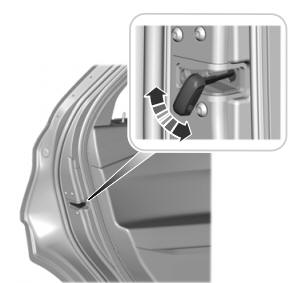
A child safety lock is on the rear edge of each rear door. You must set the child safety lock separately on each door.
Left-Hand Side

Copyright © 2026 www.foexplorer.com