
Ford Explorer: Exterior Lighting / Removal and Installation - Headlamp Leveling Sensor
Ford Explorer 2020-2026 Service Manual / Electrical / Lighting / Exterior Lighting / Removal and Installation - Headlamp Leveling Sensor
Removal
NOTE: Removal steps in this procedure may contain installation details.
Front suspension mounted
-
Remove the LH front wheel and tire assembly.
Refer to: Wheel and Tire (204-04A Wheels and Tires, Removal and Installation).
-
Disconnect the front ride height sensor electrical connector.
.jpg) |
-
Remove the front headlamp leveling sensor.
-
Remove the front headlamp leveling sensor arm anchor plate bolt.
Torque: 93 lb.in (10.5 Nm)
-
Remove the front headlamp leveling sensor anchor plate bolt.
Torque: 177 lb.in (20 Nm)
-
Remove the front headlamp leveling sensor assembly.
-
Remove the front headlamp leveling sensor arm anchor plate bolt.
.jpg) |
Rear suspension mounted
-
Remove the LH rear wheel and tire assembly.
Refer to: Wheel and Tire (204-04A Wheels and Tires, Removal and Installation).
-
Disconnect the rear ride height sensor electrical connector and separate the wiring harness guide.
.jpg) |
-
Lower the rear headlamp leveling sensor arm anchor plate.
-
Remove the rear headlamp leveling sensor anchor plate bolt.
Torque: 22 lb.ft (30 Nm)
-
Remove the rear headlamp leveling sensor arm anchor plate bolt.
Torque: 133 lb.in (15 Nm)
-
Remove the rear headlamp leveling sensor assembly.
-
Remove the rear headlamp leveling sensor anchor plate bolt.
.jpg) |
Installation
-
To install, reverse the removal procedure.
-
Calibrate the suspension height sensor. Using a
diagnostic scan tool, carry out the Ride Height Calibration routine.
Follow the scan tool directions.
 Removal and Installation - Headlamp Control Module (HCM)
Removal
NOTE:
This step is only necessary if the HCM is being replaced.
NOTE:
If installing a new module, it is necessary to
upload the module configuration information to the scan tool..
 Removal and Installation - Headlamp Switch
Special Tool(s) /
General Equipment
Interior Trim Remover
Removal
NOTE:
Removal steps in this procedure may contain installation details...
Other information:
Ford Explorer 2020-2026 Service Manual: Disassembly and Assembly of Subassemblies - Piston
DISASSEMBLY NOTE: If the piston and connecting rod are to be reinstalled, they must be assembled in the same orientation. Mark the piston orientation to the connecting rod reassembly. Remove the piston rings and discard. Remove the piston pin retainers and discard...
Ford Explorer 2020-2026 Owners Manual: Windshield Washers
Pull the lever toward you to operate the windshield washers. When you release the lever, the wipers operate for a short time. When activated, a courtesy wipe occurs a short time after the wipers stop to clear any remaining washer fluid. Note: You can switch courtesy wipe on or off in the touchscreen...
Categories
- Manuals Home
- 6th Generation Explorer Owners Manual
- 6th Generation Explorer Service Manual
- Description and Operation - Identification Codes
- General Procedures - Brake Service Mode Activation and Deactivation
- Body and Paint
- New on site
- Most important about car
Gauges
4 Inch Display
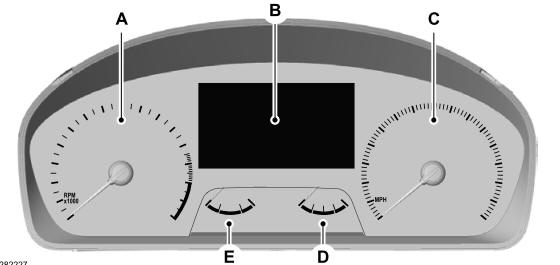
A - Tachometer.
B - Information display.
C - Speedometer.
D - Fuel gauge.
E - Engine coolant temperature gauge.

Copyright © 2026 www.foexplorer.com