
Ford Explorer: Information and Entertainment System - General Information - Vehicles Without: SYNC 3 / Removal and Installation - Front Door Speaker
Ford Explorer 2020-2026 Service Manual / Electrical / Information and Entertainment Systems / Information and Entertainment System - General Information - Vehicles Without: SYNC 3 / Removal and Installation - Front Door Speaker
Removal
NOTE: Removal steps in this procedure may contain installation details.
-
Remove the front door trim panel.
Refer to: Front Door Trim Panel (501-05 Interior Trim and Ornamentation, Removal and Installation).
-
Disconnect the electrical connector, remove the screws and the front door speaker.
Torque: 22 lb.in (2.5 Nm)
.jpg) |
Installation
-
To install, reverse the removal procedure.
 Removal and Installation - Front Control/Display Interface Module (FCDIM)
Special Tool(s) /
General Equipment
Interior Trim Remover
Removal
NOTE:
Removal steps in this procedure may contain installation details...
 Removal and Installation - Low Voltage Differential Signalling (LVDS) Cable
Special Tool(s) /
General Equipment
Interior Trim Remover
Removal
NOTE:
Removal steps in this procedure may contain installation details...
Other information:
Ford Explorer 2020-2026 Service Manual: Diagnosis and Testing - Reversing Lamps
Diagnostic Trouble Code (DTC) Chart Diagnostics in this manual assume a certain skill level and knowledge of Ford-specific diagnostic practices. REFER to: Diagnostic Methods (100-00 General Information, Description and Operation). Diagnostic Trouble Code Chart Module DTC Description Action BCM B1277:1..
Ford Explorer 2020-2026 Service Manual: Removal and Installation - Block Heater
Special Tool(s) / General Equipment Hose Clamp Remover/Installer Removal NOTE: Removal steps in this procedure may contain installation details. Drain the cooling system. Refer to: Engine Cooling System Draining, Vacuum Filling and Bleeding (303-03A Engine Cooling - 2...
Categories
- Manuals Home
- 6th Generation Explorer Owners Manual
- 6th Generation Explorer Service Manual
- Driveline
- General Procedures - Rear Camber Adjustment
- Body and Paint
- New on site
- Most important about car
Locking and Unlocking
You can use the power door lock control or the remote control to lock and unlock your vehicle.
Power Door Locks
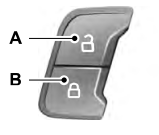
The power door lock control is on the driver and front passenger door panels.

Copyright © 2026 www.foexplorer.com