
Ford Explorer: Battery, Mounting and Cables / Removal and Installation - Battery
Ford Explorer 2020-2026 Service Manual / Electrical / Battery and Charging System / Battery, Mounting and Cables / Removal and Installation - Battery
Removal
NOTE: Removal steps in this procedure may contain installation details.
-
Disconnect the battery/batteries.
Refer to: Battery Disconnect and Connect (414-01 Battery, Mounting and Cables, General Procedures).
-
-
Disconnect the vent hose from the battery.
-
Fully loosen and remove the battery hold-down bolt and clamp. Remove the battery.
Torque: 62 lb.in (7 Nm)
-
Disconnect the vent hose from the battery.
.jpg) |
Installation
-
To install, reverse the removal procedure.
-
If installing a new battery, use the scan tool to carry
out the Battery Monitoring System (BMS) reset after the battery is
connected.
 Removal and Installation - Auxiliary Battery Isolator
Removal
NOTE:
Removal steps in this procedure may contain installation details.
Disconnect the batteries.
Refer to: Battery Disconnect and Connect (414-01 Battery, Mounting and Cables, ..
 Removal and Installation - Battery Cables - 2.3L EcoBoost (201kW/273PS)
Removal
NOTE:
This procedure provides information about routing, retaining
points and connectors of the cable. It does not include the steps for
removing components to gain access to the cable...
Other information:
Ford Explorer 2020-2026 Service Manual: General Procedures - Balance Shaft Backlash
Special Tool(s) / General Equipment 100-002 (TOOL-4201-C) Holding Fixture with Dial Indicator Gauge 303-1688Preload Tool, Balance Shaft 303-507Timing Peg, Crankshaft TDCTKIT-2001N-FLMTKIT-2001N-ROW Check Install the special tool and rotate the crankshaft slowly clockwise until the crankshaft balance weight is up against the Crankshaft TDC Timing Peg...
Ford Explorer 2020-2026 Service Manual: Removal and Installation - Second Row Seat Head Restraint Guide Sleeve
Special Tool(s) / General Equipment Flat-Bladed Screwdriver Removal Second row outboard seat - Base vehicle Push the second row outboard seat head restraint release buttons. Remove the second row outboard seat head restraint...
Categories
- Manuals Home
- 6th Generation Explorer Owners Manual
- 6th Generation Explorer Service Manual
- Engine - 2.3L EcoBoost (201kW/273PS)
- General Procedures - Rear Camber Adjustment
- Body and Paint
- New on site
- Most important about car
Child Safety Locks
When these locks are set, you cannot open the rear doors from the inside.
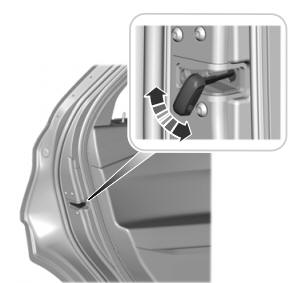
A child safety lock is on the rear edge of each rear door. You must set the child safety lock separately on each door.
Left-Hand Side

Copyright © 2026 www.foexplorer.com