
Ford Explorer: Acceleration Control / Removal and Installation - Accelerator Pedal
Ford Explorer 2020-2026 Service Manual / Powertrain / Fuel System - General Information / Acceleration Control / Removal and Installation - Accelerator Pedal
Removal
NOTICE: Activate the parking brake.
NOTE: Make sure the vehicle powertrain is powered off.
NOTE: Removal steps in this procedure may contain installation details.
-
Remove the screw cap cover.
.jpg) |
-
Disconnect the electrical connector.
.jpg) |
-
-
Remove the bolt.
Torque: 115 lb.in (13 Nm)
-
Pedal slides forward out of bracket.
-
Remove the bolt.
.jpg) |
Installation
-
To install, reverse the removal procedure.
 Description and Operation - Acceleration Control - Overview
The acceleration controls consist of the accelerator pedal, APP sensor and bracket assembly.
The throttle is controlled by an APP sensor on the accelerator pedal assembly...
 Electrical
..
Other information:
Ford Explorer 2020-2026 Service Manual: General Procedures - Powertrain/Drivetrain Mount Neutralizing
Adjustment NOTE: Refer to the appropriate section and procedure for special instructions on loosening and tightening mount fasteners. Refer to: Jacking and Lifting - Overview (100-02 Jacking and Lifting, Description and Operation). Loosen, but do not remove, the powertrain/drivetrain mount fasteners...
Ford Explorer 2020-2026 Owners Manual: Starting a Gasoline Engine
When you start the engine, the idle speed increases. This helps to warm up the engine. If the engine idle speed does not slow down automatically, have your vehicle checked by an authorized dealer. Note: You can crank the engine for a total of 60 seconds without the engine starting before the starting system temporarily disables...
Categories
- Manuals Home
- 6th Generation Explorer Owners Manual
- 6th Generation Explorer Service Manual
- Removal and Installation - All-Wheel Drive (AWD) Module
- Removal and Installation - Front Halfshaft Speed Sensor
- Automatic Transmission
- New on site
- Most important about car
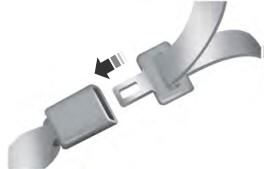
Fastening the Seatbelts
The front outboard and rear safety restraints in the vehicle are combination lap and shoulder belts.

Copyright © 2026 www.foexplorer.com