
Ford Explorer: Climate Control / Heated Exterior Mirrors (If Equipped)
Ford Explorer 2020-2026 Owners Manual / Climate Control / Heated Exterior Mirrors (If Equipped)
When you switch the heated rear window on, the heated exterior mirrors turn on.
Note: Do not remove ice from the mirrors with a scraper or adjust the mirror glass when it is frozen in place.
Note: Do not clean the mirror housing or glass with harsh abrasives, fuel or other petroleum-based cleaning products. The vehicle warranty may not cover damage caused to the mirror housing or glass.
 Rear Passenger Climate Controls
Note: Depending on your vehicle option package, the controls may look different
from what you see here.
Directing Air to the Overhead Air Vents
Press and release the button to
direct airflow ..
 Remote Start
The climate control system adjusts the interior temperature during remote start.
You can switch this feature on or off and adjust the settings using the touchscreen...
Other information:
Ford Explorer 2020-2026 Owners Manual: Keyless Starting
Note: The system may not function if the intelligent access key is close to metal objects or electronic devices, for example keys or a cell phone. Note: A valid intelligent access key must be located inside your vehicle to switch the ignition on and start your vehicle...
Ford Explorer 2020-2026 Service Manual: Description and Operation - Engine - Overview
Engine Information NOTE: When repairing engines, all parts must be contamination free. If contamination/foreign material is present when repairing an engine, premature engine failure may occur. NOTE: Specifications show the expected minimum or maximum condition...
Categories
- Manuals Home
- 6th Generation Explorer Owners Manual
- 6th Generation Explorer Service Manual
- General Procedures - Transmission Fluid Drain and Refill
- Description and Operation - Identification Codes
- General Procedures - Rear Camber Adjustment
- New on site
- Most important about car
Locking and Unlocking
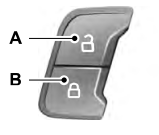
You can use the power door lock control or the remote control to lock and unlock your vehicle.
Power Door Locks
The power door lock control is on the driver and front passenger door panels.

Copyright © 2026 www.foexplorer.com