
Ford Explorer: Climate Control / Remote Start
The climate control system adjusts the interior temperature during remote start.
You can switch this feature on or off and adjust the settings using the touchscreen. See Settings.
You cannot adjust the climate control setting during remote start operation. Switch the ignition on to make adjustments.
Based on your remote start settings, the following vehicle-dependent features may or may not remain on after remote starting your vehicle:
- Climate controlled seats.
- Heated steering wheel.
- Heated mirrors.
- Heated rear window.
- Windshield wiper de-icer.
Note: For dual zone climate controlled seats, the passenger seat setting defaults to match the driver seat during remote start.
Automatic Settings
If Auto is on, the system sets the interior temperature to 72°F (22°C) and heats or cools the vehicle interior as required to achieve comfort.
Note: In cold weather, the heated rear window and heated mirrors turn on.
Last Settings
If Last Settings is on, the system uses the settings last selected before you turned off the vehicle.
Heated and Cooled Features
In Auto mode, certain heated features may switch on during cold weather, and cooled features during hot weather.
 Heated Exterior Mirrors (If Equipped)
When you switch the heated rear window on, the heated exterior mirrors turn on.
Note: Do not remove ice from the mirrors with a scraper or adjust the mirror
glass when it is frozen in place...

Other information:
Ford Explorer 2020-2026 Owners Manual: Automatic High Beam Control Indicators
The indicator illuminates to confirm when the system is ready to assist. Overriding Automatic High Beam Control WARNING: The system does not relieve you of your responsibility to drive with due care and attention. You may need to override the system if it does not turn the high beams on or off...
Ford Explorer 2020-2026 Service Manual: Removal and Installation - Brake Disc
Materials Name Specification Motorcraft® Metal Brake Parts CleanerPM-4-A, PM-4-B - Removal WARNING: Service actions on vehicles equipped with electronic brake booster and electronic parking brakes may cause unexpected brake application, which could result in injury to hands or fingers...
Categories
- Manuals Home
- 6th Generation Explorer Owners Manual
- 6th Generation Explorer Service Manual
- Description and Operation - Identification Codes
- Auxiliary Power Points
- Engine
- New on site
- Most important about car
Windshield Wipers
 Push the lever up or down to operate
the windshield wipers.
Push the lever up or down to operate
the windshield wipers.
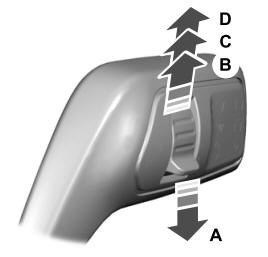
A - Single wipe.
