
Ford Explorer: Steering Wheel / Adjusting the Steering Wheel - Vehicles With: Power Adjustable Steering Column
Ford Explorer 2020-2026 Owners Manual / Steering Wheel / Adjusting the Steering Wheel - Vehicles With: Power Adjustable Steering Column
WARNING: Do not adjust the steering wheel when your vehicle is moving.
Note: Make sure that you are sitting in the correct position. See Sitting in the Correct Position.
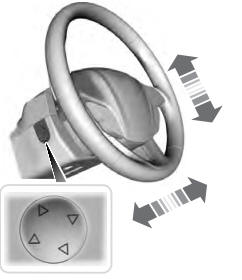
Use the control on the side of the steering column to adjust the position.
To adjust:
- Tilt: Press the top or bottom of the control.
- Telescope: Press the front or rear of the control.
 Adjusting the Steering Wheel - Vehicles With: Manual Adjustable Steering Column
WARNING: Do not adjust the steering wheel when your vehicle is moving.
Note: Make sure that you are sitting in the correct position. See Sitting
in the Correct Position...
 End of Travel Position
The steering column sets a stopping position just short of the end of the column
position to prevent damage to the steering column. A new stopping position sets
if the steering column encounters a..
Other information:
Ford Explorer 2020-2026 Owners Manual: SYNC™ 3 Troubleshooting
Voice Recognition USB and Bluetooth Audio Phone Navigation (If Equipped) Apps Wi-Fi Connectivity Personal Profiles (If Equipped) Resetting the System Simultaneously press and hold the seek up and the audio unit power buttons until the screen goes black...
Ford Explorer 2020-2026 Service Manual: Description and Operation - Airbag and Seatbelt Pretensioner Supplemental Restraint System (SRS) - System Operation and Component Description
System Operation System Diagram - Supplemental Restraint System (SRS) Item Description 1 RCM 2 Ignition Switch 3 GWM 4 Driver Seatbelt Buckle Switch 5 Passenger Seatbelt Buckle Switch 6 RHFront Impact Severity Sensor 7 Driver Door Side Impact Sensor 8 Driver C-Pillar Side Impact Sensor 9 Passenger Belt Tension Sen..
Categories
- Manuals Home
- 6th Generation Explorer Owners Manual
- 6th Generation Explorer Service Manual
- Driveline
- Body and Paint
- Auxiliary Power Points
- New on site
- Most important about car
Gauges
4 Inch Display
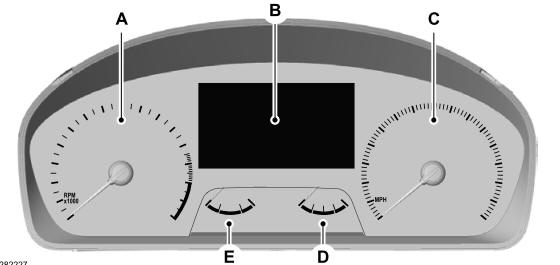
A - Tachometer.
B - Information display.
C - Speedometer.
D - Fuel gauge.
E - Engine coolant temperature gauge.

Copyright © 2026 www.foexplorer.com