
Kia Picanto: Interior features / USB charger. Floor mat anchor(s): (if equipped)
USB charger
|
Figure 1. Front 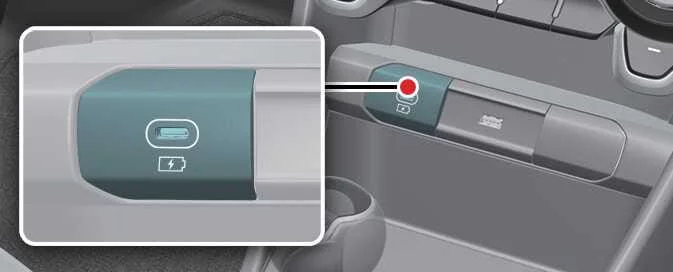
|
Figure 2. Centre (if equipped) 
|
The USB charger allows the driver and passengers to charge compatible digital devices, including smartphones and tablets, while travelling in the vehicle.
TIP
-
Quick Charge 2.0 is available for compatible smartphones and tablets that support this fast-charging technology. The referenced device list is available at https://www.qualcomm.com/documents/quickcharge-device-list. Smartphones and tablets without compatible fast-charging capability charge at a regular speed.
-
Rated output
-
Compatible digital devices using fast charging: 9.0 V, 1.67 A.
-
Digital devices using normal charging: 5.0 V, 2.1 A.
-
CAUTION
-
Use the USB charger with the vehicle switched on. Charging devices while the vehicle is off may discharge the vehicle battery.
-
Use the official USB cable supplied or specified by the manufacturer of the device you want to charge.
-
Keep foreign objects, drinks and water away from the USB charger. Liquid or debris entering the port can damage the charger.
-
Do not connect a device with a current consumption greater than 2.1 A.
-
Do not connect equipment that generates excessive electromagnetic noise to the USB port. Such equipment may cause interference during audio or audiovisual playback and disrupt the operation of other vehicle electronics.
-
An incorrect connection can seriously damage the connected devices. Damage caused by improper use is not covered by warranty service.
Floor mat anchor(s): (if equipped)
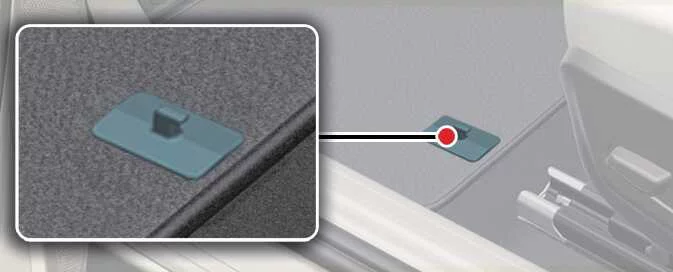
When fitting a mat over the front floor carpet, secure it to the floor mat anchor or anchors provided in your Kia Picanto. These retainers help prevent the mat from sliding forwards and interfering with the footwell area.
WARNING
Observe all of the following precautions whenever installing a floor mat in the vehicle:
-
Remove any protective film from the carpet before fitting a front floor mat. A mat placed over protective film may slide freely, potentially interfering with the pedals and causing unintended braking or acceleration.
-
Before driving, check that every floor mat is securely attached to the vehicle’s floor mat anchors.
-
Never use a floor mat that cannot be firmly secured to the anchors provided in the vehicle.
-
Do not place one floor mat on top of another, such as an all-weather rubber mat over a carpeted mat. Fit only one mat in each floor position.
-
Use mats of an appropriate thickness that are designed to be securely fastened to the floor without obstructing the pedals. Installing mats over plastic carpet-protection film can damage or break the retaining rings, leaving the mats unsecured. A loose mat in the driver’s footwell is particularly dangerous because it may cause unintended acceleration or braking.
Remove all plastic protective film from the carpets before installing the floor mats.
The driver’s side floor mat anchors are designed to hold the mat securely in position. To help prevent interference with pedal operation, Kia recommends using only the Kia floor mat specifically designed for your vehicle.
 Air ventilation seat : (if equipped). Power outlet
Air ventilation seat : (if equipped)
Figure 1. Driver's seat
The seat temperature setting changes according to the selected switch position. Use the heating or ventilation
control to adjust ..
 Shopping bag holder. Clothes hanger
Shopping bag holder
CAUTION
Do not hang a bag weighing more than 3 kg (7 lbs.) from the holder. Exceeding this limit may
damage the shopping bag holder...
Other information:
Kia Picanto 2024-2026 Owner's Manual: Wheel Replacement. Tyre Traction
Wheel Replacement If you replace a metal wheel, choose one equivalent to the original factory wheel in diameter, rim width and offset. Warning A wheel of the wrong size can affect wheel and bearing life, braking and stopping performance, handling, ground clearance, clearance between the body and tyre, snow-chain clearance, speedometer and odometer calibration, headlight aim and bumpe..
Ford Explorer 2020-2026 Service Manual: Removal and Installation - Cowl Panel Grille
Removal NOTE: Removal steps in this procedure may contain installation details. Remove the wiper pivot arms. Refer to: Windshield Wiper Pivot Arm (501-16 Wipers and Washers, Removal and Installation). Remove the retainers...
Categories
- Manuals Home
- 6th Generation Explorer Owners Manual
- 6th Generation Explorer Service Manual
- Description and Operation - Identification Codes
- Engine - 2.3L EcoBoost (201kW/273PS)
- General Service Information
- New on site
- Most important about car
Gauges
4 Inch Display
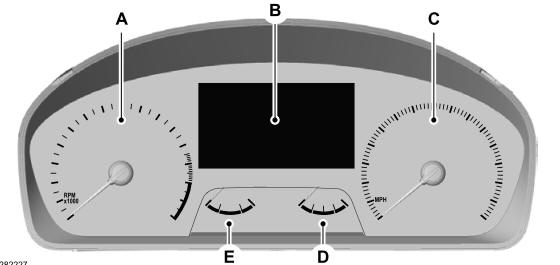
A - Tachometer.
B - Information display.
C - Speedometer.
D - Fuel gauge.
E - Engine coolant temperature gauge.
