
Ford Explorer: Steering Wheel and Column Electrical Components / Removal and Installation - Steering Column Multifunction Switch RH
Ford Explorer 2020-2026 Service Manual / Chassis / Steering System / Steering Wheel and Column Electrical Components / Removal and Installation - Steering Column Multifunction Switch RH
Removal
NOTE: Removal steps in this procedure may contain installation details.
-
Remove the steering column shrouds.
Refer to: Steering Column Shrouds (501-05 Interior Trim and Ornamentation, Removal and Installation).
-
NOTE: Make sure the component terminals are not bent or damaged.
Remove the retainers and the RH steering column multifunction switch.
.jpg) |
Installation
-
To install, reverse the removal procedure.
 Removal and Installation - Steering Column Multifunction Switch LH
Removal
NOTE:
Removal steps in this procedure may contain installation details.
Remove the steering column shrouds.
Refer to: Steering Column Shrouds (501-05 Interior Trim and Ornamenta..
 Removal and Installation - Steering Wheel Multifunction Switch
Removal
NOTE:
Removal steps in this procedure may contain installation details.
NOTE:
Vehicles with paddle switches shown others similar.
Remove the steering wheel...
Other information:
Ford Explorer 2020-2026 Service Manual: Removal and Installation - Brake Disc Shield
Removal NOTE: Removal steps in this procedure may contain installation details. Remove the wheel bearing and wheel hub. Refer to: Wheel Bearing and Wheel Hub (204-02 Rear Suspension, Removal and Installation). Remove the 3 bolts and the brake disc shield...
Ford Explorer 2020-2026 Service Manual: Removal and Installation - High Voltage Battery Cables - Hybrid Electric Vehicle (HEV)
Removal WARNING: To prevent the risk of high-voltage shock, always follow precisely all warnings and service instructions, including instructions to depower the system. The high-voltage system utilizes approximately 450 volts DC, provided through high-voltage cables to its components and modules...
Categories
- Manuals Home
- 6th Generation Explorer Owners Manual
- 6th Generation Explorer Service Manual
- General Service Information
- Driveline
- Description and Operation - Jacking and Lifting - Overview
- New on site
- Most important about car
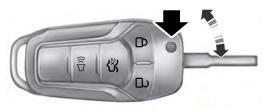
Integrated Keyhead Transmitter (If Equipped)
Use the key blade to start your vehicle and unlock or lock the driver door from outside your vehicle. The integrated keyhead transmitter functions as a programmed ignition key that operates all the locks and starts your vehicle, as well as a remote control.

Copyright © 2026 www.foexplorer.com