
Kia Picanto: Exterior Lighting / Removal and Installation - Headlamp Assembly
Ford Explorer 2020-2026 Service Manual / Electrical / Lighting / Exterior Lighting / Removal and Installation - Headlamp Assembly
Removal
NOTE: Removal steps in this procedure may contain installation details.
-
Remove the front bumper cover.
Refer to: Front Bumper Cover (501-19 Bumpers, Removal and Installation).
-
Remove the 5 headlamp assembly bolts.
Torque: 28 lb.in (3.2 Nm)
.jpg) |
-
Release the tab and position the headlamp assembly forward.
.jpg) |
-
Disconnect the electrical connectors and remove the headlamp assembly.
.jpg) |
Installation
-
To install, reverse the removal procedure.
-
NOTE: This step is only necessary when installing a new component.
Adjust the headlamp assembly.
Refer to: Headlamp Adjustment (417-01 Exterior Lighting) .
 Removal and Installation - Front Fog Lamp
Removal
NOTE:
Removal steps in this procedure may contain installation details.
Remove the front bumper cover.
Refer to: Front Bumper Cover (501-19 Bumpers, Removal and Installation)...
 Removal and Installation - Headlamp Control Module (HCM)
Removal
NOTE:
This step is only necessary if the HCM is being replaced.
NOTE:
If installing a new module, it is necessary to
upload the module configuration information to the scan tool..
Other information:
Ford Explorer 2020-2026 Owners Manual: Cleaning the Windows and Wiper Blades
Car wash chemicals and environmental fallout can result in windshield and wiper blade contamination. Dirty windshield and wipers will result in poor windshield wiper operation. Keep the windshield and wiper blades clean to maintain windshield wiper performance...
Ford Explorer 2020-2026 Service Manual: Removal and Installation - Auxiliary Power Point
Special Tool(s) / General Equipment 501-194Remover, Power PointTKIT-2014D-ROW2TKIT-2014D-FL_ROW Removal Open the power point cover. Position the power point extractor so that it engages in the adjacent slots in the power point socket...
Categories
- Manuals Home
- 6th Generation Explorer Owners Manual
- 6th Generation Explorer Service Manual
- Auxiliary Power Points
- Fuel Filler Funnel Location & Running Out of Fuel
- Automatic Transmission - 10-Speed Automatic Transmission – 10R60
- New on site
- Most important about car
Locking and Unlocking
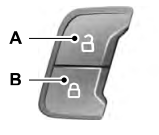
You can use the power door lock control or the remote control to lock and unlock your vehicle.
Power Door Locks
The power door lock control is on the driver and front passenger door panels.

Copyright © 2026 www.foexplorer.com