
Ford Explorer: Body Closures / Removal and Installation - Hands-Free Liftgate Actuation Module
Ford Explorer 2020-2026 Service Manual / Body and Paint / Body and Paint / Body Closures / Removal and Installation - Hands-Free Liftgate Actuation Module
Removal
NOTE: Removal steps in this procedure may contain installation details.
-
Remove the rear bumper cover.
Refer to: Rear Bumper Cover (501-19 Bumpers, Removal and Installation).
-
Remove the following items:
-
Disconnect the electrical connectors and position aside the wirings.
-
Remove the retainer.
-
Remove the screw.
Torque: 19 lb.in (2.2 Nm)
-
Disconnect the electrical connectors and position aside the wirings.
.jpg) |
-
Pull out and remove the hands-free liftgate actuation module.
.jpg) |
Installation
-
To install, reverse the removal procedure.
-
NOTE: This step is only necessary when installing a new component.
Using a diagnostic scan tool, perform a LIN new module initialization following the on-screen instructions.
 Removal and Installation - Hands-Free Liftgate Actuation Lower Sensor
Removal
NOTE:
Removal steps in this procedure may contain installation details.
Remove the rear bumper cover.
Refer to: Rear Bumper Cover (501-19 Bumpers, Removal and Installation)...
 Removal and Installation - Hands-Free Liftgate Actuation Upper Sensor
Removal
NOTE:
Removal steps in this procedure may contain installation details.
Remove the rear bumper cover.
Refer to: Rear Bumper Cover (501-19 Bumpers, Removal and Installation)...
Other information:
Ford Explorer 2020-2026 Service Manual: Description and Operation - Gasoline and Gasoline-Ethanol Fuel Systems Health and Safety Precautions
WARNING: Before working on or disconnecting any of the fuel tubes or fuel system components, relieve the fuel system pressure to prevent accidental spraying of fuel. Fuel in the fuel system remains under high pressure, even when the engine is not running...
Ford Explorer 2020-2026 Service Manual: Removal and Installation - Passenger Airbag
Removal WARNING: The following procedure prescribes critical repair steps required for correct supplemental restraint system operation during a crash. Follow all notes and steps carefully. Failure to follow step instructions may result in incorrect operation of the supplemental restraint system and increases the risk of serious personal injury or death in a crash...
Categories
- Manuals Home
- 6th Generation Explorer Owners Manual
- 6th Generation Explorer Service Manual
- Engine - 2.3L EcoBoost (201kW/273PS)
- General Procedures - Brake Service Mode Activation and Deactivation
- General Procedures - Rear Camber Adjustment
- New on site
- Most important about car
Child Safety Locks
When these locks are set, you cannot open the rear doors from the inside.
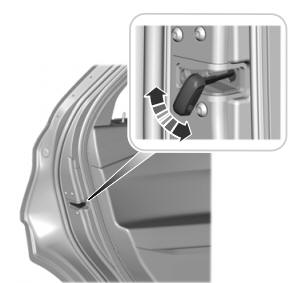
A child safety lock is on the rear edge of each rear door. You must set the child safety lock separately on each door.
Left-Hand Side

Copyright © 2026 www.foexplorer.com