
Ford Explorer: Rear Disc Brake / Removal and Installation - Brake Disc Shield
Ford Explorer 2020-2026 Service Manual / Chassis / Brake System / Rear Disc Brake / Removal and Installation - Brake Disc Shield
Removal
NOTE: Removal steps in this procedure may contain installation details.
-
Remove the wheel bearing and wheel hub.
Refer to: Wheel Bearing and Wheel Hub (204-02 Rear Suspension, Removal and Installation).
-
Remove the 3 bolts and the brake disc shield.
Torque: 159 lb.in (18 Nm)
.jpg) |
Installation
-
To install, reverse the removal procedure.
 Removal and Installation - Brake Disc
Materials
Name
Specification
Motorcraft® Metal Brake Parts CleanerPM-4-A, PM-4-B
-
Removal
WARNING:
Service actions on vehicles equipped with electronic brake
..
 Removal and Installation - Brake Pads
Special Tool(s) /
General Equipment
Brake Caliper Piston Retractor
Removal
WARNING:
Service actions on vehicles equipped with electronic brake
booster and electronic parking ..
Other information:
Ford Explorer 2020-2026 Owners Manual: Auto-Start-Stop
The system helps reduce fuel consumption by automatically stopping and restarting the engine when your vehicle has stopped. The engine restarts automatically when you release the brake pedal. In some situations, your vehicle may restart automatically, for example: To maintain interior comfort...
Ford Explorer 2020-2026 Service Manual: General Procedures - Engine Cooling System Draining, Vacuum Filling and Bleeding
Special Tool(s) / General Equipment ROB75240Coolant/Battery Refractometer (Fahrenheit) Fluid Container Cooling System Vacuum Tester and Refiller Draining NOTICE: The coolant must be recovered in a suitable, clean container for reuse...
Categories
- Manuals Home
- 6th Generation Explorer Owners Manual
- 6th Generation Explorer Service Manual
- Body and Paint
- Fuel Filler Funnel Location & Running Out of Fuel
- Removal and Installation - Front Halfshaft Speed Sensor
- New on site
- Most important about car
Child Safety Locks
When these locks are set, you cannot open the rear doors from the inside.
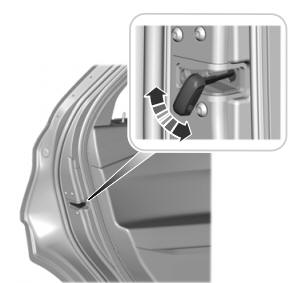
A child safety lock is on the rear edge of each rear door. You must set the child safety lock separately on each door.
Left-Hand Side

Copyright © 2026 www.foexplorer.com