
Ford Explorer: Information and Entertainment System - General Information - Vehicles With: SYNC 3 / General Procedures - Speaker Audio Test
Ford Explorer 2020-2026 Service Manual / Electrical / Information and Entertainment Systems / Information and Entertainment System - General Information - Vehicles With: SYNC 3 / General Procedures - Speaker Audio Test
Activation
NOTE: The procedure used to download the audio files varies, depending on the web browser used.
-
Using a suitable web browser, download all of the diagnostic sound tracks to a suitable USB drive.
- 125Hz Sample
- 100Hz Sample
- 80Hz Sample
- 63Hz Sample
- 50Hz Sample
- 40Hz Sample
 General Procedures - SYNC Module [APIM] Programming
Programming
NOTE:
If a new APIM is being installed, install the new APIM before carrying out the following procedure.
If replacing the APIM do not connect the new APIM to a Wi-Fi networ..
 Lighting
..
Other information:
Ford Explorer 2020-2026 Service Manual: Removal and Installation - Power Fold Seat Module [SCMJ]
Removal NOTE: Removal steps in this procedure may contain installation details. NOTE: The SCMJ (power fold seat module) is located under the LH (left-hand) second row seat cushion frame. NOTE: This step is only necessary when installing a new component...
Ford Explorer 2020-2026 Service Manual: Removal and Installation - Thermostat
Removal NOTE: Removal steps in this procedure may contain installation details. Drain the cooling system. Refer to: Engine Cooling System Draining, Vacuum Filling and Bleeding (303-03A Engine Cooling - 2.3L EcoBoost (201kW/273PS), General Procedures)...
Categories
- Manuals Home
- 6th Generation Explorer Owners Manual
- 6th Generation Explorer Service Manual
- General Service Information
- Auxiliary Power Points
- Body and Paint
- New on site
- Most important about car
Child Safety Locks
When these locks are set, you cannot open the rear doors from the inside.
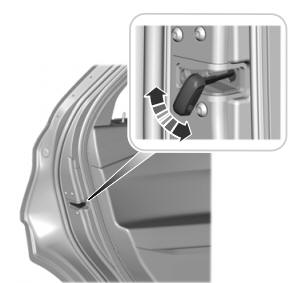
A child safety lock is on the rear edge of each rear door. You must set the child safety lock separately on each door.
Left-Hand Side

Copyright © 2026 www.foexplorer.com