
Ford Explorer: SYNC™ 3 / Entertainment
Ford Explorer 2020-2026 Owners Manual / SYNC™ 3 / Entertainment
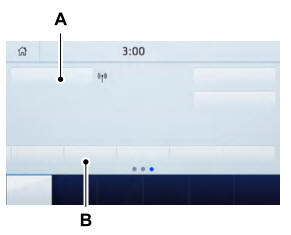
A Audio source. Select to choose a different audio source.
B Presets. Swipe left to view more presets.
You can access these options using the touchscreen or voice commands.
Sources Press this button to select the source of media you want to listen to.
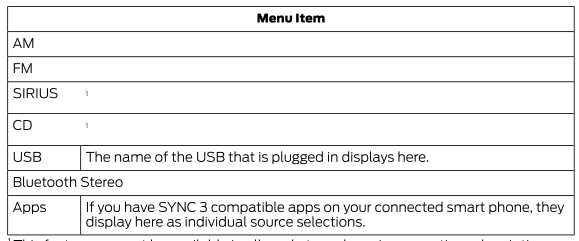
1 This feature may not be available in all markets and requires an active subscription.
 Using Voice Recognition
The system allows you to interact with the entertainment, information and communication
systems on your vehicle using voice commands. This allows you to keep your hands
on the steering wheel and f..
 AM/FM Radio
Tuning a Station
You can use the tune or seek controls on the radio bezel to select a station.
To tune a station using the touchscreen, select:
A pop up appears, allowing you to type in the frequ..
Other information:
Ford Explorer 2020-2026 Owners Manual: SYNC™ 3 Troubleshooting
Voice Recognition USB and Bluetooth Audio Phone Navigation (If Equipped) Apps Wi-Fi Connectivity Personal Profiles (If Equipped) Resetting the System Simultaneously press and hold the seek up and the audio unit power buttons until the screen goes black...
Ford Explorer 2020-2026 Owners Manual: Rear Parking Aid
WARNING: The system may not detect objects with surfaces that absorb reflection. Always drive with due care and attention. Failure to take care may result in a crash. WARNING: The system may not detect small or moving objects, particularly those close to the ground...
Categories
- Manuals Home
- 6th Generation Explorer Owners Manual
- 6th Generation Explorer Service Manual
- Removal and Installation - All-Wheel Drive (AWD) Module
- Removal and Installation - Front Halfshaft Speed Sensor
- Body and Paint
- New on site
- Most important about car
Gauges
4 Inch Display
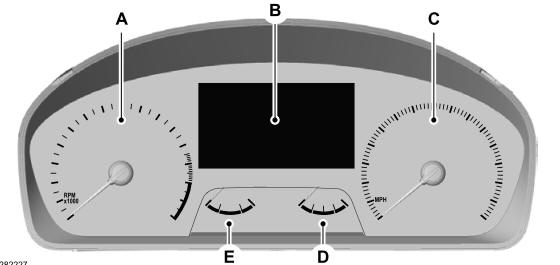
A - Tachometer.
B - Information display.
C - Speedometer.
D - Fuel gauge.
E - Engine coolant temperature gauge.

Copyright © 2026 www.foexplorer.com