
Ford Explorer: Automatic Transmission External Controls - 10-Speed Automatic Transmission – 10R60 / Description and Operation - External Controls - Overview
Ford Explorer 2020-2026 Service Manual / Powertrain / Automatic Transmission / Automatic Transmission External Controls - 10-Speed Automatic Transmission – 10R60 / Description and Operation - External Controls - Overview
The shift by wire system uses a rotary dial GSM to interface with the PCM to select gear positions.
The steering wheel includes paddle switches allowing the driver to manually shift the transmission when M is selected on the rotary dial.
The transmission can not be shifted out of P unless the brake pedal is applied.
A transmission park manual release cable allows the transmission to be shifted out of P manually.


Other information:
Ford Explorer 2020-2026 Service Manual: Removal and Installation - High Voltage Low Current Fuse - Hybrid Electric Vehicle (HEV)
Removal WARNING: To prevent the risk of high-voltage shock, always follow precisely all warnings and service instructions, including instructions to depower the system. The high-voltage system utilizes approximately 450 volts DC, provided through high-voltage cables to its components and modules...
Ford Explorer 2020-2026 Owners Manual: Locking and Unlocking
You can use the power door lock control or the remote control to lock and unlock your vehicle. Power Door Locks The power door lock control is on the driver and front passenger door panels. A - Unlock B - Lock. Remote Control You can use the remote control at any time...
Categories
- Manuals Home
- 6th Generation Explorer Owners Manual
- 6th Generation Explorer Service Manual
- Description and Operation - Jacking and Lifting - Overview
- Removal and Installation - Front Halfshaft Speed Sensor
- Automatic Transmission
- New on site
- Most important about car
Gauges
4 Inch Display
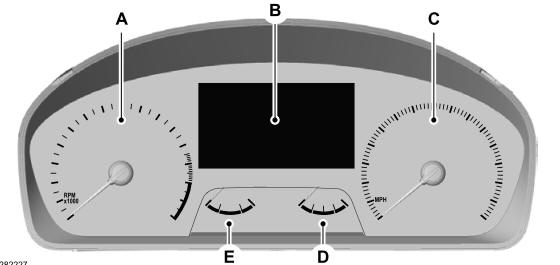
A - Tachometer.
B - Information display.
C - Speedometer.
D - Fuel gauge.
E - Engine coolant temperature gauge.

Copyright © 2026 www.foexplorer.com