
Kia Picanto: Automatic Transmission External Controls - 10-Speed Automatic Transmission – 10R60 / Description and Operation - External Controls - Component Location
Ford Explorer 2020-2026 Service Manual / Powertrain / Automatic Transmission / Automatic Transmission External Controls - 10-Speed Automatic Transmission – 10R60 / Description and Operation - External Controls - Component Location
.jpg)
| Item | Description |
|---|---|
| 1 | GSM |
| 2 | Transmission park manual release bracket and lever assembly |
| 3 | Transmission park manual release cable |
 Description and Operation - External Controls - Overview
The shift by wire system uses a rotary dial GSM to interface with the PCM to select gear positions.
The steering wheel includes paddle switches allowing the driver to manually shift the transmission ..
 Description and Operation - External Controls - System Operation and Component Description
System Diagram
Item
Description
1
GSM
2
GWM
3
RCM
4
IPC
5
PCM
6
BCM
7
Driver Door Latch #1
8
Driver Door Latch #2
9
Brake On/Off (..
Other information:
Ford Explorer 2020-2026 Owners Manual: Reporting Safety Defects (U.S. Only)
If you believe that your vehicle has a defect which could cause a crash or could cause injury or death, you should immediately inform the National Highway Traffic Safety Administration (NHTSA) in addition to notifying Ford Motor Company. If NHTSA receives similar complaints, it may open an investigation, and if it finds that a safety defect exists in a group of vehicles, it may order a reca..
Kia Picanto 2024-2026 Owner's Manual: Fuel requirements. Petrol engine
Petrol engine Unleaded For Europe For optimum performance, use unleaded petrol with an octane rating of RON (Research Octane Number) 95 / AKI (Anti-Knock Index) 91 or higher. This is the recommended fuel grade for the Kia Picanto petrol engine covered by these European fuel requirements...
Categories
- Manuals Home
- 6th Generation Explorer Owners Manual
- 6th Generation Explorer Service Manual
- Auxiliary Power Points
- Description and Operation - Identification Codes
- Removal and Installation - All-Wheel Drive (AWD) Module
- New on site
- Most important about car
Child Safety Locks
When these locks are set, you cannot open the rear doors from the inside.
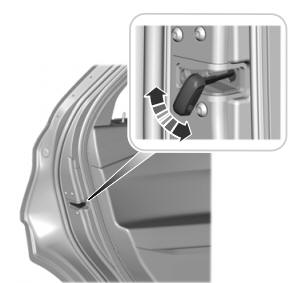
A child safety lock is on the rear edge of each rear door. You must set the child safety lock separately on each door.
Left-Hand Side

Copyright © 2026 www.foexplorer.com