
Ford Explorer: Lighting / Daytime Running Lamps - Vehicles With: Daytime Running Lamps (DRL)
Ford Explorer 2020-2026 Owners Manual / Lighting / Daytime Running Lamps - Vehicles With: Daytime Running Lamps (DRL)
WARNING: The daytime running lamps system does not activate the rear lamps and may not provide adequate lighting during low visibility driving conditions. Make sure you switch the headlamps on, as appropriate, during all low visibility conditions. Failure to do so may result in a crash.
The system turns the lamps on in daylight conditions.
To switch the system on, switch the lighting control to any position except headlamps.
 Daytime Running Lamps - Vehicles With: Configurable Daytime Running Lamps
WARNING: The daytime running lamps system does not activate the rear lamps
and may not provide adequate lighting during low visibility driving conditions...
 Front Fog Lamps (If Equipped)
Switching the Front Fog Lamps On or Off
Only switch the front fog lamps on during reduced visibility.
You can switch the front fog lamps on if any of the following occur:
You set the lighting co..
Other information:
Ford Explorer 2020-2026 Service Manual: Removal and Installation - Rear Heater Core Outlet Line
Removal NOTE: The rear heater core outline is installed from the factory as a one-piece assembly. The replacement part is supplied as an assembly, containing the rear heater core inlet line and the rear evaporator inlet and outlet lines. Remove the rear evaporator rear outlet and inlet line...
Ford Explorer 2020-2026 Service Manual: General Procedures - Tire Pressure Monitoring System (TPMS) Sensor Location Calibration
Special Tool(s) / General Equipment 204-D081A (204-D081) Tire Pressure Monitor (TPMS) Ford Diagnostic Equipment Programming NOTE: The TPMS can be placed into learn mode using a diagnostic scan tool or manually where a diagnostic scan tool is not available...
Categories
- Manuals Home
- 6th Generation Explorer Owners Manual
- 6th Generation Explorer Service Manual
- Automatic Transmission
- Removal and Installation - Front Halfshaft Speed Sensor
- Description and Operation - Jacking and Lifting - Overview
- New on site
- Most important about car
Gauges
4 Inch Display
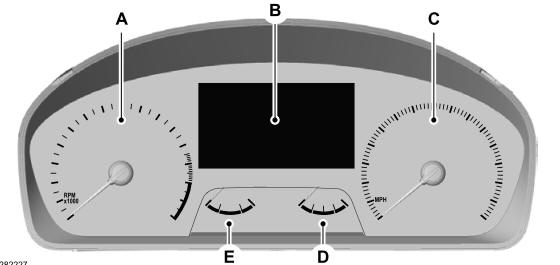
A - Tachometer.
B - Information display.
C - Speedometer.
D - Fuel gauge.
E - Engine coolant temperature gauge.

Copyright © 2026 www.foexplorer.com