Kia Picanto: Controls and Features / Windscreen defrosting and defogging
WARNING
Windscreen heating
Do not select the  or
or  position while cooling the cabin in extremely humid
weather. The temperature difference between the outside air and the windscreen can cause mist to form on the outside
of the glass, obscuring your view. If this happens, move the mode selection knob or button to the
position while cooling the cabin in extremely humid
weather. The temperature difference between the outside air and the windscreen can cause mist to form on the outside
of the glass, obscuring your view. If this happens, move the mode selection knob or button to the  position shown and reduce the fan
speed using the knob or button.
position shown and reduce the fan
speed using the knob or button.
-
For maximum defrosting performance, turn the temperature control fully to the right to select the hottest setting and set the fan to its highest speed.
-
If you also want warm air at floor level while defrosting or demisting the windscreen, select the floor-defrost airflow position.
-
Before driving your Kia Picanto, remove all snow and ice from the windscreen, rear window, outside rearview mirrors and every side window to ensure a clear view around the vehicle.
-
Clear snow and ice from the bonnet and the air inlet in the cowl grille. Keeping these areas clear improves heater and defroster efficiency and helps reduce the likelihood of mist forming on the inside of the windscreen.
Manual climate control system
To defog inside windscreen
-
Select any operating fan speed. Do not leave the fan speed control in the 0 position.
-
Adjust the temperature control to the desired setting.
-
Select the
 or
or  airflow position shown.
 -
The system automatically selects outside (fresh) air and activates the air conditioning to help remove moisture from the air.
If the air conditioning and outside (fresh) air position are not selected automatically, use their corresponding buttons to select them manually.
To defrost outside windscreen
-
Turn the fan speed control fully to the right to select the highest blower speed.
-
Move the temperature control to its hottest setting.
-
Select the
defrost position shown. -
The outside (fresh) air position and air conditioning are selected automatically.
Automatic climate control system
To defog inside windscreen
-
Adjust the fan speed control to the desired operating speed.
-
Select the temperature you want the system to provide.
-
Press the windscreen defrost button marked with the
symbol. -
The system automatically selects outside (fresh) air. Air conditioning is switched on according to the detected ambient temperature.
If the air conditioning and outside (fresh) air position are not selected automatically, select them manually using
the corresponding buttons. When the position is selected, a low fan speed is
automatically increased to a higher setting.
To defrost outside windscreen
-
Set the fan speed to its highest position by turning the control fully to the right.
-
Select the maximum heating setting, identified as HI.
-
Press the windscreen defrost button marked with the
symbol. -
The outside (fresh) air position is selected automatically, and the air conditioning switches on according to the detected ambient temperature.
If the position is selected while the fan is
running at a low speed, the system automatically increases the fan to a higher speed.
Defogging logic: (if equipped). Automatic climate control system: (if equipped)
To help prevent mist from forming on the inside of the windscreen, the Kia Picanto climate system automatically
controls air intake or air conditioning under certain conditions, including selection of the  or
or  position. Use the
following procedure to cancel this automatic defogging logic or restore it after cancellation.
position. Use the
following procedure to cancel this automatic defogging logic or restore it after cancellation.
Automatic climate control system: (if equipped)
-
Turn the ignition switch to the ON position before beginning the procedure.
-
Select windscreen defrost mode by pressing the defrost button marked with the
symbol. -
Keep the air conditioning button, marked A/C, pressed while pressing the air intake control button at least 5 times within 3 seconds.
The indicator in the air intake control button flashes 3 times to confirm the change. This indicates that the automatic defogging logic has either been cancelled or restored to its programmed setting.
If the battery becomes discharged or is disconnected, the system resets to the programmed defogging logic setting.
 Sunroof inside air recirculation: (if equipped)
Opening the sunroof automatically changes the air intake to the outside (fresh) air position, allowing outside air to
enter the cabin.
If you select recirculated air while the sunroof is open, t..
 Storage compartments
The storage compartments in your Kia Picanto provide space for small items used by the driver and passengers. Choose
items that fit comfortably inside each compartment without preventing its cove..
Other information:
Ford Explorer 2020-2026 Service Manual: Description and Operation - Gasoline and Gasoline-Ethanol Fuel Systems Health and Safety Precautions
WARNING: Before working on or disconnecting any of the fuel tubes or fuel system components, relieve the fuel system pressure to prevent accidental spraying of fuel. Fuel in the fuel system remains under high pressure, even when the engine is not running...
Ford Explorer 2020-2026 Owners Manual: Principle of Operation
WARNING: Always drive and ride with your seatback upright and the lap belt snug and low across the hips. WARNING: Children must always be properly restrained. WARNING: Do not allow a passenger to hold a child on their lap when your vehicle is moving...
Categories
- Manuals Home
- 6th Generation Explorer Owners Manual
- 6th Generation Explorer Service Manual
- Traction Control
- Description and Operation - Jacking and Lifting - Overview
- General Procedures - Rear Camber Adjustment
- New on site
- Most important about car
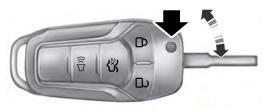
Integrated Keyhead Transmitter (If Equipped)
Use the key blade to start your vehicle and unlock or lock the driver door from outside your vehicle. The integrated keyhead transmitter functions as a programmed ignition key that operates all the locks and starts your vehicle, as well as a remote control.