Kia Picanto: Driver assistance guide / Manual Speed Limit Assist (MSLA). Manual Speed Limit Assist operation
 |
|
Manual Speed Limit Assist lets you set a maximum speed for the Kia Picanto when you want to avoid driving above a chosen limit.
If the vehicle exceeds the set limit, the displayed speed limit flashes and a chime sounds. The alert continues until the vehicle’s speed returns to or below the selected limit.
Manual Speed Limit Assist operation
Setting speed limit
-
When travelling at the speed you want to set, press and hold the Driving Assist button (
 ). The Speed Limit indicator (
 ) appears on the instrument cluster.
-
Move the (+) switch up or the (−) switch down, then release it when the desired speed is displayed.
To adjust the limit continuously, move and hold the (+) switch up or the (−) switch down. The speed first changes to the nearest multiple of 10 km/h (5 mph), then increases or decreases in 10 km/h (5 mph) increments.
-
The selected speed limit is shown on the instrument cluster.
If you need to drive faster than the set limit, press the accelerator pedal.
While the Kia Picanto remains above the set limit, the displayed limit flashes and a chime sounds. The alert stops when the vehicle’s speed returns to or below the limit.
NOTE
To drive faster than the set speed limit, press the accelerator pedal firmly until the kickdown function activates.
Temporarily pausing Manual Speed Limit Assist
|
Press the pause switch () to suspend the set speed limit temporarily. The set limit is
no longer active, but the Speed Limit indicator () stays illuminated.
Resuming Manual Speed Limit Assist
|
After pausing Manual Speed Limit Assist, use the (+), (−) or pause () switch to resume operation.
Moving the (+) switch up or the (−) switch down sets the speed limit to the Kia Picanto’s current speed shown on the instrument cluster.
Pressing the resume switch () restores the previously selected speed limit.
Turning off Manual Speed Limit Assist
|
Press the Driving Assist button () to switch off Manual Speed Limit Assist. The Speed Limit
indicator () will disappear from the instrument cluster.
WARNING
Follow these precautions whenever you use Manual Speed Limit Assist:
-
Set the speed limit below the legal maximum for the country where you are driving.
-
When you are not using the function, switch Manual Speed Limit Assist off to avoid setting a limit unintentionally. Check that the Speed Limit indicator (
) is no
longer displayed. -
Manual Speed Limit Assist does not replace safe, attentive driving. The driver remains responsible for controlling the vehicle, anticipating sudden or unexpected situations and responding to changing road conditions.
 Safe Exit Warning malfunction and limitations
Safe Exit Warning malfunction
A: Check Blind-Spot Safety system
If Safe Exit Warning detects a fault, a ..
 Intelligent Speed Limit Assist (ISLA): (if equipped)
Intelligent Speed Limit Assist uses detected road signs and navigation data to show the applicable speed limit and
help the driver keep the Kia Picanto within that limit...
Other information:
Kia Picanto 2024-2026 Owner's Manual: Intelligent Speed Limit Assist settings. Intelligent Speed Limit Assist operation. Warning and control
Intelligent Speed Limit Assist settings Speed Limit A: Driver Assistance With the Kia Picanto switched on, open User Settings > Driver Assistance > Driving Safety > Speed Limit on the instrument cluster, or Setup > Vehicle > Driver Assistance > Speed Limit on the infotainment system...
Ford Explorer 2020-2026 Service Manual: General Procedures - Air Conditioning (A/C) Compressor Leak Detection
Special Tool(s) / General Equipment Air Conditioning Service Unit Electronic Leak Detector Air Conditioning Adaptor Kit Leak detection Recover the refrigerant. Refer to Air Conditioning (A/C) System Recovery, Evacuation and Charging procedure in Group 412...
Categories
- Manuals Home
- 6th Generation Explorer Owners Manual
- 6th Generation Explorer Service Manual
- Driveline
- Description and Operation - Identification Codes
- Removal and Installation - Front Halfshaft Speed Sensor
- New on site
- Most important about car
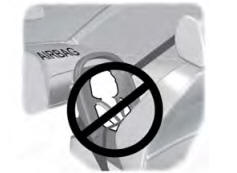
Children and Airbags
WARNING: Airbags can kill or injure a child in a child restraint. Never place a rear-facing child restraint in front of an active airbag. If you must use a forward-facing child restraint in the front seat, move the seat upon which the child restraint is installed all the way back.