Kia Picanto: Driver assistance guide / Forward Collision-Avoidance Assist (FCA) (Sensor Fusion): (if equipped)
Basic function

|
Forward Collision-Avoidance Assist in the Kia Picanto detects vehicles, powered two-wheelers, pedestrians and cyclists ahead on the road. If the system identifies a possible collision, it may alert you through a warning message in the instrument cluster and an audible warning. It may also provide braking assistance to help reduce the speed of an impact or avoid the collision, depending on the situation.
Junction Turning function

|
The Junction Turning function can apply emergency braking to help avoid a collision with an oncoming vehicle, powered two-wheeler or cyclist in an adjacent lane. It assists when you turn left at a crossroads in a left-hand-drive vehicle, or right in a right-hand-drive vehicle, with the corresponding turn signal switched on.
Direct Oncoming function

|
[A]: Oncoming vehicle
The Direct Oncoming function helps reduce impact speed when a collision risk is detected with a vehicle or powered two-wheeler approaching from the opposite direction. Its purpose is to help lessen the speed at which such a collision occurs.
Detecting sensor
|
Figure 1. Front camera 
|
Figure 2. Front radar 
|
The illustrations above show the locations of the front camera and front radar. Refer to them when identifying the detecting sensors and the surrounding areas that require care.
CAUTION
-
Never dismantle a detecting sensor or its assembly. Avoid any work or handling that could damage the sensor, its housing or associated components.
-
If either detecting sensor has been repaired or replaced, have the vehicle inspected by a professional workshop. Kia recommends visiting an authorised Kia dealer or service partner following this work.
-
An impact to the radar or the area around it may prevent Forward Collision-Avoidance Assist from operating correctly, even if no warning message appears in the instrument cluster. If an impact occurs, Kia recommends having the vehicle checked by an authorised Kia dealer or service partner.
-
Do not attach accessories or stickers to the windscreen, and do not apply windscreen tinting. These additions can affect the camera’s view through the glass.
-
Take particular care to keep the front view camera dry. Avoid exposing it to moisture when cleaning or working around the camera area.
-
Never place reflective objects, such as white paper or mirrors, on top of the instrument panel. Reflections from these items can interfere with the camera’s view.
-
Keep objects away from the windscreen and do not install accessories on the glass. They may affect the climate control system’s defogging and defrosting performance, potentially preventing the driver assistance systems from operating.
-
Do not fit a number plate frame, bumper sticker, film, bumper guard or similar item near the front radar cover. Keep this area free of additions that could interfere with detection.
-
Keep the front radar and its cover clean, removing dirt and debris that could affect their operation.
Use only a soft cloth when washing the vehicle around these components. Never direct a pressurised water jet at the sensor or its cover.
-
Genuine Kia front radar sensor covers are designed to meet the required quality and performance standards. Painting or altering the cover without proper approval may prevent Forward Collision-Avoidance Assist from functioning correctly.
When repairing or replacing radar sensor covers, use Kia Genuine Parts or parts of an equivalent standard with proven quality and performance.
-
Fitting a trailer, carrier or similar equipment may affect Forward Collision-Avoidance Assist performance. The system may not operate correctly while this equipment is installed.
- Forward Collision-Avoidance Assist settings
- Forward Collision-Avoidance Assist operation
- Forward Collision-Avoidance Assist malfunction and limitations
 Limitations of Forward Collision-Avoidance Assist
Forward Collision-Avoidance Assist in the Kia Picanto may fail to operate correctly or may intervene unexpectedly in
the circumstances listed below...
 Forward Collision-Avoidance Assist settings
Forward safety
A: Driver Assistance
With the vehicle switched on, se..
Other information:
Kia Picanto 2024-2026 Owner's Manual: Electronic Parking Brake (EPB): (if equipped)
After parking your Kia Picanto, apply the Electronic Parking Brake (EPB) to help secure the vehicle against movement caused by external forces. Make applying the parking brake part of your routine whenever you leave the vehicle parked. Applying the parking brake with EPB switch Depre..
Kia Picanto 2024-2026 Owner's Manual: Air Cleaner (Petrol 1.0 MPI, 1.0 FFV and 1.2 MPI). Filter Replacement. Air Cleaner (Smartstream G1.0 and G1.2). Filter Replacement
Air Cleaner (Petrol 1.0 MPI, 1.0 FFV and 1.2 MPI). Filter Replacement Filter Replacement Replace the air cleaner filter when necessary; do not wash it. When inspecting the air-cleaner element, you may clean the filter with compressed air. Release the air-cleaner cover clips and disconnect the air-cleaner hose...
Categories
- Manuals Home
- 6th Generation Explorer Owners Manual
- 6th Generation Explorer Service Manual
- Auxiliary Power Points
- Traction Control
- Fuel Filler Funnel Location & Running Out of Fuel
- New on site
- Most important about car
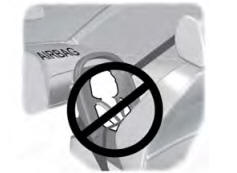
Children and Airbags
WARNING: Airbags can kill or injure a child in a child restraint. Never place a rear-facing child restraint in front of an active airbag. If you must use a forward-facing child restraint in the front seat, move the seat upon which the child restraint is installed all the way back.