Kia Picanto: What to do in an emergency / ERA-GLONASS emergency call. ERA-GLONASS system
 |
|
The vehicle is equipped with a device*1 that connects to the ERA-GLONASS system and enables an emergency call to response teams. ERA-GLONASS is an automatic emergency call service for traffic accidents and certain other accidents*2 on roads in the Russian Federation. It enables the vehicle’s occupants to contact an officer at the Single Duty Dispatch Service when an accident occurs on those roads.
Under the conditions described in the Owner’s Manual and the Warranty and Service Book, the ERA-GLONASS system sends information to the Single Duty Dispatch Service. This may include the vehicle’s location, vehicle type and VIN (Vehicle Identification Number).
The information stored in the ERA-GLONASS system is sent to the rescue centre to help provide an appropriate response for the driver and passengers. It is deleted after the rescue operation has been completed.
The ERA-GLONASS system operator, Joint Stock Company “GLONASS”, is responsible for the system’s components other than the equipment installed in the vehicle, in accordance with Federal Law No. 395-FZ, “On the State Automated Information System ERA-GLONASS”, dated 28 December 2013.
-
In the Owner’s Manual, “ERA-GLONASS device” refers to the equipment installed in the vehicle that provides a connection to the ERA-GLONASS system.
-
“Other accidents” means accidents on roads in the Russian Federation that result in injuries and/or require assistance. If such an accident occurs, stop the vehicle and press the SOS button. The button’s location is shown in the illustration in the “ERA-GLONASS emergency call (if equipped)” section of the Owner’s Manual. When a call is made, the system gathers information about the vehicle from which it originated, then connects the vehicle to an officer at the Single Duty Dispatch Service so the caller can explain the reason for the emergency call.
ERA-GLONASS system
 |
|
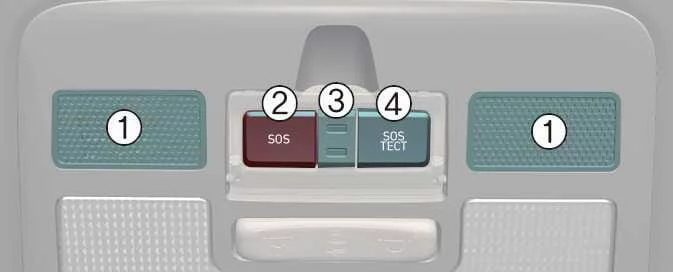
SOS button: The driver or a passenger can press this button to place an emergency call to the Single Duty Dispatch Service.
SOS TEST button (test): This button checks that the system is working and is intended for use by Kia dealership specialists. SOS TEST mode may be activated only by a specialist at an authorised Kia dealer or service partner. To avoid placing an unintended call, do not press this button or activate SOS TEST mode yourself.
LED: When the ignition switch is in the ON position, the red and green LEDs illuminate for three seconds. If the system is operating normally, both LEDs then turn off.
If a system problem occurs, the LED remains illuminated in red.
Automatic accident reporting
-
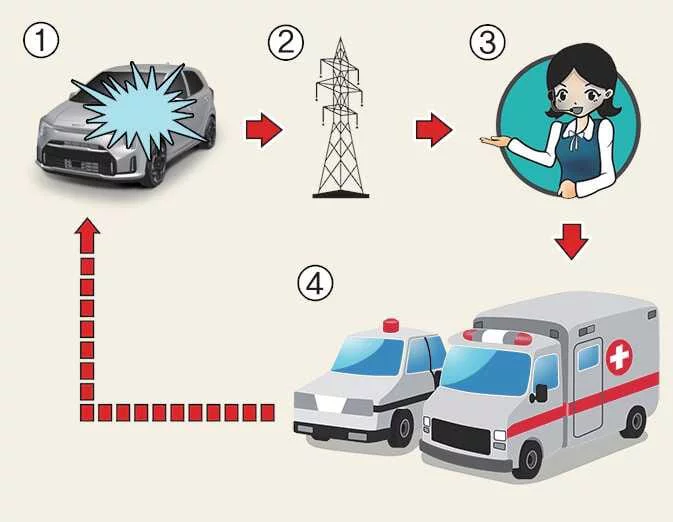
Traffic accident detected
-
Connection to the Single Duty Dispatch Service
-
Emergency services notified
When the ERA-GLONASS device detects a vehicle accident, it automatically places an emergency call to the Single Duty Dispatch Service so that the appropriate rescue response can be arranged.
To help emergency services provide assistance, the ERA-GLONASS system automatically sends accident data to the dispatch service when it detects a traffic accident.
Once an automatic emergency call has started, pressing the SOS button will not end it. The call remains connected until the dispatch officer who receives it disconnects.
NOTE
In some minor traffic accidents, ERA-GLONASS may not place an automatic emergency call. If assistance is needed, you can make a call manually by pressing the SOS button.
CAUTION
The system cannot operate if mobile network coverage or GPS and GLONASS signals are unavailable.
Manual accident reporting
-
Press the SOS button to place a call.
-
The system connects to the Single Duty Dispatch Service.
-
The dispatch service contacts the appropriate emergency services.
The driver or a passenger can request help by pressing the SOS button to call the Single Duty Dispatch Service and contact the required emergency services.
A manual emergency call can be cancelled by pressing the SOS button again, but only before the call connects.
When a manual emergency call is made, the ERA-GLONASS system automatically sends the traffic accident or other accident data to the dispatch officer during the call.
If a traffic accident or another accident occurs and you need to make a manual emergency call, follow this procedure:
-
Stop the vehicle. Then follow traffic rules and take steps to protect yourself and other road users.
-
Press the SOS button. The device will register with the wireless communication network and collect the minimum required data about the vehicle and its location in accordance with the device’s technical requirements. It will then connect you to an ERA-GLONASS dispatch officer, who will ask about the reason for the call.
-
After clarifying the reason for the emergency call, the Single Duty Dispatch Service officer sends the minimum required data to the emergency services and ends the call.
If the emergency call is not made according to the procedure above, it may be treated as an erroneous call.
WARNING
ERA-GLONASS emergency power supply
-
If a collision cuts off the vehicle’s main power supply, the ERA-GLONASS system battery can provide power for one hour during an emergency.
-
Replace the ERA-GLONASS system battery every four years. For further information, refer to the ERA-GLONASS emergency call section.
Red LED illumination (system malfunction)
If the red LED stays illuminated during normal driving, the ERA-GLONASS system may have a fault. Have the system checked immediately by an authorised Kia dealer or service partner. Otherwise, correct operation of the ERA-GLONASS device installed in the Kia Picanto cannot be guaranteed. The vehicle owner is responsible for consequences resulting from failure to observe these instructions.
Unauthorised removal or modification
The ERA-GLONASS system places emergency calls to request assistance. Removing the system or changing its settings without authorisation may affect driving safety and could cause an unintended call to the Single Duty Dispatch Service. Do not alter the settings of the ERA-GLONASS equipment installed in the Kia Picanto yourself or have third parties make unauthorised changes.
Test Mode
|
|
The ERA-GLONASS equipment installed in the passenger compartment consists of these components:
-
Microphone
-
SOS button
-
SOS TEST button
-
LED
The ERA-GLONASS device installed in your Kia Picanto can be tested to confirm that it is working. To prevent accidental emergency calls and incorrect operation, the test must be carried out at an authorised Kia dealer or service partner, by its specialists and on its premises. The test procedure must follow the instructions for using the system interface to start test mode.
Test mode starts when the SOS TEST button is pressed. Voice guidance then begins and leads the system check. During the test, both the red and green LEDs illuminate.
To stop test mode while voice guidance is playing, press the SOS TEST button again.
NOTE
Mobile network operators in many countries are phasing out 2G and 3G services. Decisions to discontinue either network technology are made by the operators and are outside Kia’s control.
If mobile operators discontinue 2G or 3G service, automatic and manual eCall functions may no longer be available in the event of an accident or another situation requiring emergency assistance.
 Emergency Commodity
The Kia Picanto may be supplied with emergency equipment to help you respond to unexpected situations on the road. Check what is available in your vehicle and familiarise yourself with its locatio..
 Maintenance
..
Other information:
Kia Picanto 2024-2026 Owner's Manual: Seats
The seats and adjustment features fitted to your Kia Picanto may differ from those shown in the illustration. Use the diagram to identify the controls applicable to your vehicle. Driver’s seat Forward and backward: Adjusts the seat’s distance from the steering wheel and pedals...
Ford Explorer 2020-2026 Service Manual: Removal and Installation - Shift Solenoids (SS)
Materials Name Specification Motorcraft® MERCON® ULV Automatic Transmission FluidXT-12-QULV WSS-M2C949-A, MERCON® ULV Removal All Solenoids Remove the transmission fluid pan gasket and filter. Refer to: Transmission Fluid Pan, Gasket and Filter (307-01B Automatic Transmission - 10-Speed Automatic Transmission – 10R80, Removal and Installation)...
Categories
- Manuals Home
- 6th Generation Explorer Owners Manual
- 6th Generation Explorer Service Manual
- Electric Parking Brake
- Engine - 2.3L EcoBoost (201kW/273PS)
- Auxiliary Power Points
- New on site
- Most important about car
Children and Airbags
WARNING: Airbags can kill or injure a child in a child restraint. Never place a rear-facing child restraint in front of an active airbag. If you must use a forward-facing child restraint in the front seat, move the seat upon which the child restraint is installed all the way back.