Kia Picanto: Wheels and Tires / Technical Specifications
Wheel Lug Nut Torque Specifications
WARNING: When you install a wheel, always remove any corrosion, dirt or foreign materials present on the mounting surfaces of the wheel or the surface of the wheel hub, brake drum or brake disc that contacts the wheel. Make sure to secure any fasteners that attach the rotor to the hub so they do not interfere with the mounting surfaces of the wheel. Installing wheels without correct metal-to-metal contact at the wheel mounting surfaces can cause the wheel nuts to loosen and the wheel to come off while your vehicle is in motion, resulting in loss of vehicle control, personal injury or death.

* Torque specifications are for nut and bolt threads free of dirt and rust. Use only Ford recommended replacement fasteners.
Retighten the lug nuts to the specified torque within 100 miles (160 kilometers) after any wheel disturbance (such as tire rotation, changing a flat tire, wheel removal).
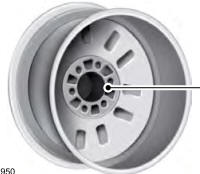
A - Wheel pilot bore
Inspect the wheel pilot bore and mounting surface prior to installation. Remove any visible corrosion or loose particles.
 Changing a Road Wheel
WARNING: If the tire pressure monitor sensor becomes damaged it may not
function.
Note: You should only use tire sealants in roadside emergencies as they
may cause damage to the tire pressure mon..

Other information:
Ford Explorer 2020-2026 Service Manual: Diagnosis and Testing - Climate Control System
Diagnostic Trouble Code (DTC) Chart Diagnostics in this manual assume a certain skill level and knowledge of Ford-specific diagnostic practices. REFER to: Diagnostic Methods (100-00 General Information, Description and Operation). Diagnostic Trouble Code Chart Module DTC Description Action ACCM B11EE:..
Ford Explorer 2020-2026 Service Manual: Removal and Installation - Brake Pads
Special Tool(s) / General Equipment 12” / 300mm C-Clamp Materials Name Specification Motorcraft® Metal Brake Parts CleanerPM-4-A, PM-4-B - Removal WARNING: Service actions on vehicles equipped with electronic brake booster and electronic parking brakes may cause unexpected brake application, which could result in injury to hands or fingers...
Categories
- Manuals Home
- 6th Generation Explorer Owners Manual
- 6th Generation Explorer Service Manual
- Removal and Installation - Front Halfshaft Speed Sensor
- Auxiliary Power Points
- Automatic Transmission
- New on site
- Most important about car
Locking and Unlocking
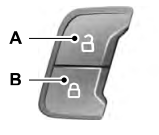
You can use the power door lock control or the remote control to lock and unlock your vehicle.
Power Door Locks
The power door lock control is on the driver and front passenger door panels.