
Kia Picanto: Starting and Stopping the Engine / Keyless Starting
Ford Explorer 2020-2026 Owners Manual / Starting and Stopping the Engine / Keyless Starting
Note: The system may not function if the intelligent access key is close to metal objects or electronic devices, for example keys or a cell phone.
Note: A valid intelligent access key must be located inside your vehicle to switch the ignition on and start your vehicle.
Ignition Modes
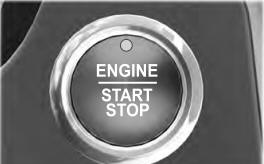
The keyless starting system has three modes:
Off: Turns the ignition off.
- Without applying the brake pedal, press and release the button once when the ignition is in the on mode, or when your vehicle is running but is not moving.
On: All electrical circuits are operational and the warning lamps and indicators illuminate.
- Without applying the brake pedal, press and release the button once.
Start: Starts your vehicle. The engine may not start when your vehicle starts.
- Press the brake pedal, and then press the button for any length of time. An indicator light on the button illuminates when the ignition is on and when your vehicle starts.
 General Information
WARNING: Extended idling at high engine speeds can produce very high temperatures
in the engine and exhaust system, creating the risk of fire or other damage...
 Starting a Gasoline Engine
When you start the engine, the idle speed increases. This helps to warm up the
engine. If the engine idle speed does not slow down automatically, have your vehicle
checked by an authorized dealer...
Other information:
Ford Explorer 2020-2026 Service Manual: General Procedures - Refrigerant Oil Adding - Vehicles With: R1234YF Refrigerant
Special Tool(s) / General Equipment Air Conditioning Service Unit Refrigerant Oil Injector Set Filling Refer to the Refrigerant Oil Adding (when new components are installed) chart below for refrigerant oil adding amounts and methods of installation...
Ford Explorer 2020-2026 Service Manual: Diagnosis and Testing - Parking Aid
Diagnostic Trouble Code (DTC) Chart Diagnostics in this manual assume a certain skill level and knowledge of Ford-specific diagnostic practices. REFER to: Diagnostic Methods (100-00 General Information, Description and Operation). Diagnostic Trouble Code Chart Module DTC Description Action IPMB B1303:..
Categories
- Manuals Home
- 6th Generation Explorer Owners Manual
- 6th Generation Explorer Service Manual
- Body and Paint
- Automatic Transmission
- General Procedures - Transmission Fluid Drain and Refill
- New on site
- Most important about car
Gauges
4 Inch Display
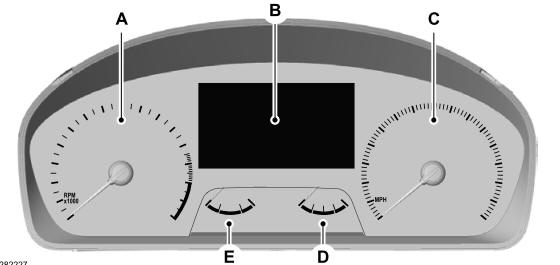
A - Tachometer.
B - Information display.
C - Speedometer.
D - Fuel gauge.
E - Engine coolant temperature gauge.

Copyright © 2026 www.foexplorer.com