
Kia Picanto: Stability Control / Using Stability Control
Ford Explorer 2020-2026 Owners Manual / Stability Control / Using Stability Control
Electronic Stability Control - Base Model
The system automatically turns on each time you switch the ignition on.
You cannot switch the stability control and roll stability control systems off, but when you shift into reverse (R), the systems deactivate.
You can switch the traction control system off or on. See Using Traction Control.
Electronic Stability Control - ST Model
 The system turns on each time you
switch the ignition on. You can switch off the traction control portion of the system
independently. See Using Traction Control in the Owner's Manual.
The system turns on each time you
switch the ignition on. You can switch off the traction control portion of the system
independently. See Using Traction Control in the Owner's Manual.
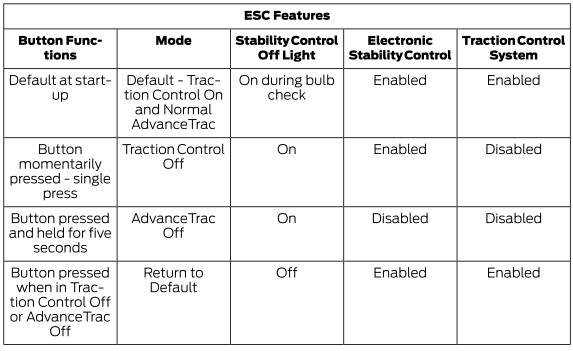
Note: Do not use the AdvanceTrac Off setting on public roadways.
 Principle of Operation
WARNING: Vehicle modifications involving braking system, aftermarket roof
racks, suspension, steering system, tire construction and wheel and tire size may
change the handling characteristics of y..

Other information:
Ford Explorer 2020-2026 Service Manual: Description and Operation - Instrument Panel Cluster (IPC) - Overview
Overview The IPC uses the following methods and functionality to alert the driver of vehicle conditions: gauges informational indicators warning indicators warning messages warning chimes The base IPC uses a single centered 4-inch screen to display driver information with analog gauges...
Ford Explorer 2020-2026 Service Manual: Removal and Installation - Variable Camshaft Timing (VCT) Oil Control Solenoid
Removal NOTE: Removal steps in this procedure may contain installation details. Remove the valve cover. Refer to: Valve Cover (303-01A Engine - 2.3L EcoBoost (201kW/273PS), Removal and Installation). Remove the bolts and the VCT oil control solenoids...
Categories
- Manuals Home
- 6th Generation Explorer Owners Manual
- 6th Generation Explorer Service Manual
- General Service Information
- Description and Operation - Identification Codes
- Interior Trim and Ornamentation
- New on site
- Most important about car
Gauges
4 Inch Display
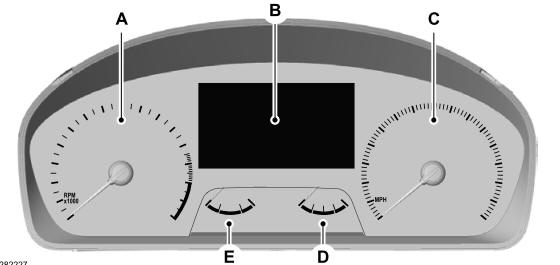
A - Tachometer.
B - Information display.
C - Speedometer.
D - Fuel gauge.
E - Engine coolant temperature gauge.

Copyright © 2026 www.foexplorer.com