
Ford Explorer: Roadside Emergencies / Hazard Flashers
Ford Explorer 2020-2026 Owners Manual / Roadside Emergencies / Hazard Flashers
Note: The hazard flashers operate when the ignition is in any position, or if the key is not in the ignition. If used when the vehicle is not running, the battery loses charge. As a result, there may be insufficient power to restart your vehicle.
 The flasher control is on the instrument
panel. Use your hazard flashers when your vehicle is creating a safety hazard for
other motorists.
The flasher control is on the instrument
panel. Use your hazard flashers when your vehicle is creating a safety hazard for
other motorists.
- Press the flasher control and all front and rear direction indicators flash.
- Press the button again to switch them off.
 Roadside Assistance
Vehicles Sold in the United States: Getting Roadside Assistance
To fully assist you should you have a vehicle concern, Ford Motor Company offers
a complimentary roadside assistance program...
 Fuel Shutoff
WARNING: If your vehicle has been involved in a crash, have the fuel system
checked. Failure to follow this instruction could result in fire, personal injury
or death...
Other information:
Ford Explorer 2020-2026 Owners Manual: Fastening the Seatbelts
The front outboard and rear safety restraints in the vehicle are combination lap and shoulder belts. Insert the belt tongue into the proper buckle (the buckle closest to the direction the tongue is coming from) until you hear a snap and feel it latch...
Ford Explorer 2020-2026 Owners Manual: General Information
WARNING: Driving while distracted can result in loss of vehicle control, crash and injury. We strongly recommend that you use extreme caution when using any device that may take your focus off the road. Your primary responsibility is the safe operation of your vehicle...
Categories
- Manuals Home
- 6th Generation Explorer Owners Manual
- 6th Generation Explorer Service Manual
- General Procedures - Rear Camber Adjustment
- Removal and Installation - Front Halfshaft Speed Sensor
- Body and Paint
- New on site
- Most important about car
Gauges
4 Inch Display
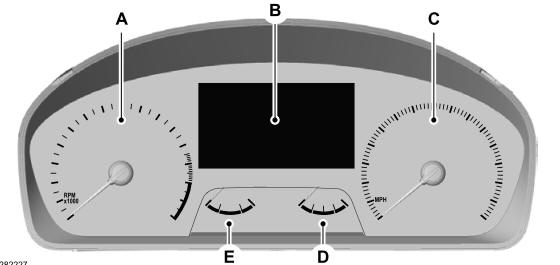
A - Tachometer.
B - Information display.
C - Speedometer.
D - Fuel gauge.
E - Engine coolant temperature gauge.

Copyright © 2026 www.foexplorer.com